Model Examination Paper 2027 & Onwards — Computer Science Paper III (Practical)
Time Allowed: 1 hour · Total Marks: 10 (Stage I: 2 Marks, Stage II: 2 Marks, Stage III: 4 Marks, School Record: 2 Marks) · Instructions: Copy and paste the HTML/JavaScript codes for Task 1 through Task 6 into an MS Word file, save it with your Name and Candidate ID, and submit the printout along with the practical booklet.
Task 1 & Task 2 — HTML Webpage Title & JavaScript Heading via document.write()STAGE I · 2 Marks · SLO 10.2.1
Topic: Unit 10: Programming in JavaScript (Input and Output Functions)
Equipment & Software: Computer, Printer, Notepad, Web Browser, and MS Word (for code printout submission)
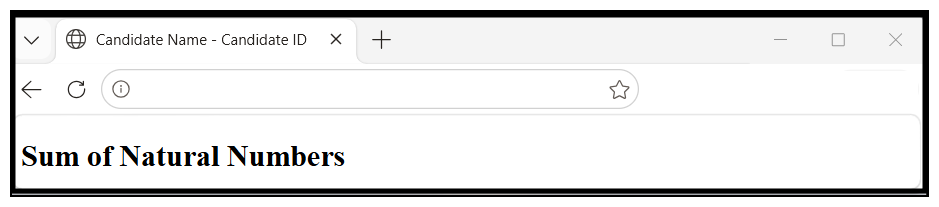
• Task 1 (1 Mark): Write the HTML code to display 'Candidate Name and Candidate ID' in the title of the webpage.
• Task 2 (1 Mark): Write the JavaScript code to display the heading 'Sum of Natural Numbers' using document.write().
Reference HTML / JavaScript Solution Code:
<!DOCTYPE html>
<html>
<head>
    <title>Candidate Name - Candidate ID</title>
</head>
<body>
    <script>
        document.write("<h2>Sum of Natural Numbers</h2>");
    </script>
</body>
</html>
Task 3 & Task 4 — JavaScript prompt() Input & for Loop Sum of Natural NumbersSTAGE II · 3 Marks · SLO 10.2.3, 10.5.3
Topic: Unit 10: Programming in JavaScript (prompt() Input & for Loop Structure)
Equipment & Software: Computer, Notepad, and Web Browser
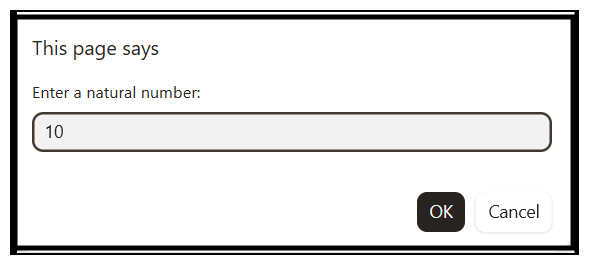
• Task 3 (1 Mark): Write JavaScript code to accept a natural number from the user using the prompt() function and store it in a variable.
• Task 4 (2 Marks): Write the JavaScript code to use a for loop to calculate the sum of all natural numbers till the entered number.
Reference HTML / JavaScript Solution Code:
<!DOCTYPE html>
<html>
<head>
    <title>Candidate Name - Candidate ID</title>
</head>
<body>
    <script>
        document.write("<h2>Sum of Natural Numbers</h2>");
        let n = Number(prompt("Enter a natural number:"));
        let sum = 0;
        for (let i = 1; i <= n; i++) {
            sum = sum + i;
        }
    </script>
</body>
</html>
Task 5, Task 6 & Task 7 — Display Output via document.write(), alert() Confirmation & PrintoutSTAGE III · 3 Marks · SLO 10.2.1, 10.5.3
Topic: Unit 10: Programming in JavaScript (document.write() & window.alert() Output)
Equipment & Software: Computer, Printer, Notepad, Web Browser, and MS Word
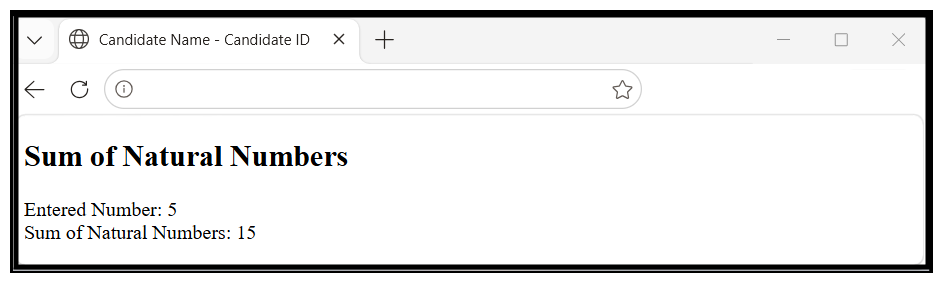
• Task 5 (1 Mark): Display the entered number and the calculated sum using document.write() ('Entered Number: 5' / 'Sum of Natural Numbers: 15').
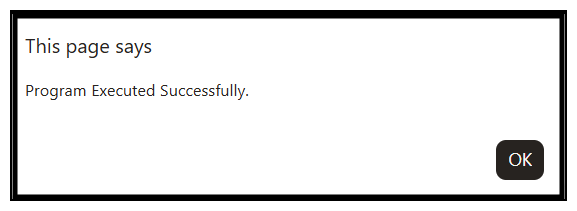
• Task 6 (1 Mark): Show the message 'Program Executed Successfully' in an alert() box.
• Task 7 (1 Mark): Print the source program and the output with your candidate ID and centre ID.
Reference HTML / JavaScript Solution Code:
<!DOCTYPE html>
<html>
<head>
    <title>Candidate Name - Candidate ID</title>
</head>
<body>
    <script>
        document.write("<h2>Sum of Natural Numbers</h2>");
        let n = Number(prompt("Enter a natural number:"));
        let sum = 0;
        for (let i = 1; i <= n; i++) {
            sum += i;
        }
        document.write("Entered Number: " + n + "<br>");
        document.write("Sum of Natural Numbers: " + sum);
        alert("Program Executed Successfully.");
    </script>
</body>
</html>
Class X Practical Journal / Portfolio VerificationSCHOOL RECORD · 2 Marks · SLO Practical Portfolio
Topic: Endorsed Practical Lab Journal (Class X JavaScript & Digital Literacy Practical Activities)
Equipment & Software: Endorsed Practical Journal / Portfolio
Practical journal/portfolio developed by the student across the academic session and endorsed by the subject teacher or principal, submitted during the Paper III Practical Examination (2 Marks).