← Computer Science IX past papers

Computer Science IX · 2017 · E-Marking Notes (Questions & Solved Better Responses)

AGA KHAN UNIVERSITY EXAMINATION BOARD
Notes from E-Marking Centre on SSC-I Computer Science Annual Examinations 2017
Digital Edition: Questions, Marking Schemes & Solved Better Responses (2025 Syllabus Aligned)
Q.1Constructed Response Questions (CRQs)
2025 Syllabus Outcome (1.6.3): describe the following types of language translators: a. compilers, b. interpreter, c. assembler;
Question Text
Consider the types of computers and programming language translators given in the box below:
•Analog Computer • Digital Computer • Hybrid Computer • Assembler • Compiler • Interpreter
Complete each statement using an appropriate term from the box. Each term should be used only ONCE. (5 Marks)
i. _________________________ performs arithmetic and logic operations with discrete values.
ii. _________________________ translates the source code into the object code (machine code).
iii. _________________________ uses flow of electricity or mechanical motion to model problems and generate answers quickly.
iv. _________________________ checks each line of a program for possible errors and then executes that line.
v. _________________________ is the combination of analog and digital computers.
Checking Hints (Marking Scheme • 5 Marks)
  • 1 mark for each correct term: i. Digital Computer, ii. Compiler (or Assembler), iii. Analog Computer, iv. Interpreter, v. Hybrid Computer (5 × 1 = 5 Marks).
✓ BETTER RESPONSE (SOLVED MODEL ANSWER)Full Marks (5/5)
i. `Digital Computer` performs arithmetic and logic operations with discrete values.
ii. `Compiler` *(or `Assembler`)* translates the source code into the object code (machine code).
iii. `Analog Computer` uses flow of electricity or mechanical motion to model problems and generate answers quickly.
iv. `Interpreter` checks each line of a program for possible errors and then executes that line.
v. `Hybrid Computer` is the combination of analog and digital computers.
Q.2aConstructed Response Questions (CRQs)
2025 Syllabus Outcome (1.2.1): define various input and output devices, including keyboards, touchscreen, pointing devices, biometric scanners, sensors, recognition systems, audio devices, display screens, printers, plotters, cutters, and actuators;
Question Text
Describe an appropriate purpose of each of the following input devices:
•Voice Synthesiser
•Mouse
•Keyboard (3 Marks)
Checking Hints (Marking Scheme • 3 Marks)
  • 1 mark each for describing the purpose of Voice Synthesiser (takes voice/audio input and converts into digital data), Mouse (pointing device to select/click/drag items), and Keyboard (enters text/numbers/commands).
✓ BETTER RESPONSE (SOLVED MODEL ANSWER)Full Marks (3/3)
Part a: Purpose of Input Devices (3 Marks — 1 Mark Each)
1.Voice Synthesiser / Voice Recognition Input (1 Mark): Captures spoken human voice (audio signals) and converts it into electrical/digital data that the computer can process or use to execute voice commands.
2.Mouse (1 Mark): A handheld pointing device used to move the cursor/pointer on the screen, select icons, open files/folders, and drag-and-drop objects in a Graphical User Interface.
3.Keyboard (1 Mark): The primary text input device containing alphanumeric, punctuation, and function keys used to enter textual, numeric, and symbolic data and commands into the computer.
Q.2bConstructed Response Questions (CRQs)
2025 Syllabus Outcome (1.3.1): distinguish among the memory measuring units such as bits, bytes, kilobytes, megabytes, and gigabytes in computer memory;
Question Text
There are some video files and the size of each file is 64 megabyte (MB). How many of these video files can be stored in 1 gigabyte (GB) storage capacity of a flash drive? Show your working. (2 Marks)
Checking Hints (Marking Scheme • 2 Marks)
  • 1 mark for converting 1 GB = 1024 MB.
  • 1 mark for dividing 1024 / 64 = 16 video files.
✓ BETTER RESPONSE (SOLVED MODEL ANSWER)Full Marks (2/2)
Part b: Number of 64 MB Video Files in a 1 GB Flash Drive (2 Marks)
1.Convert flash drive capacity from Gigabytes (GB) to Megabytes (MB):
1 GB=1024 MB1\text{ GB} = 1024\text{ MB}
2.Divide total storage capacity by the size of each video file (64 MB64\text{ MB}):
Number of files=1024 MB64 MB=16 video files\text{Number of files} = \frac{1024\text{ MB}}{64\text{ MB}} = 16\text{ video files}
Q.3aConstructed Response Questions (CRQs)
Out of 2025 Syllabus2 Marks • Level A
Question Text
Convert the given byte into equivalent hexadecimal number. Show your working. (2 Marks)
(10111100)2(10111100)_2
Checking Hints (Marking Scheme • 2 Marks)
  • 1 mark for splitting into 4-bit groups (1011 = 11 = B, 1100 = 12 = C).
  • 1 mark for writing (BC)₁₆.
✓ BETTER RESPONSE (SOLVED MODEL ANSWER)Full Marks (2/2)
Part a: Binary (10111100)2(10111100)_2 to Hexadecimal Conversion (2 Marks)
1.Split the 8-bit byte into two 4-bit nibbles from right to left:
1011⏟Left nibble1100⏟Right nibble\underbrace{1011}_{\text{Left nibble}} \quad \underbrace{1100}_{\text{Right nibble}}
2.Convert each 4-bit group to its decimal and hexadecimal equivalent:
•10112=(1×8)+(0×4)+(1×2)+(1×1)=1110=B161011_2 = (1 \times 8) + (0 \times 4) + (1 \times 2) + (1 \times 1) = 11_{10} = \mathbf{B_{16}}
•11002=(1×8)+(1×4)+(0×2)+(0×1)=1210=C161100_2 = (1 \times 8) + (1 \times 4) + (0 \times 2) + (0 \times 1) = 12_{10} = \mathbf{C_{16}}
3.Combine the hexadecimal digits:
(10111100)2=(BC)16(10111100)_2 = (\mathbf{BC})_{16}
Q.3bConstructed Response Questions (CRQs)
Out of 2025 Syllabus2 Marks • Level A
Question Text
Show that addition of two binary numbers, 1001001110010011 and 0110110001101100, gives a result which is equal to 255255 in decimal number system. (2 Marks)
Checking Hints (Marking Scheme • 2 Marks)
  • 1 mark for binary addition yielding (11111111)₂.
  • 1 mark for converting (11111111)₂ to 255₁₀ (or converting 255 to 11111111₂).
✓ BETTER RESPONSE (SOLVED MODEL ANSWER)Full Marks (2/2)
Part b: Binary Addition & Decimal Verification (2 Marks)
Step 1: Add the two binary numbers:
```text
1 0 0 1 0 0 1 1 (147 in decimal)
+ 0 1 1 0 1 1 0 0 (108 in decimal)
Q.4aConstructed Response Questions (CRQs)
Out of 2025 Syllabus2 Marks • Level U
Question Text
Recycle Bin and Internet Explorer are two icons on the Windows desktop.
Describe ONE major purpose of each of them. (2 Marks)
Checking Hints (Marking Scheme • 2 Marks)
  • 1 mark for Recycle Bin (stores deleted files so they can be restored or permanently deleted).
  • 1 mark for Internet Explorer (web browser used to browse/search information on the internet).
✓ BETTER RESPONSE (SOLVED MODEL ANSWER)Full Marks (2/2)
Part a: Purpose of Recycle Bin and Internet Explorer (2 Marks)
•Recycle Bin (1 Mark): Temporarily stores files and folders that have been deleted by the user, allowing accidentally deleted items to be restored to their original location or permanently erased.
•Internet Explorer (1 Mark): A web browser application used to access, view, and navigate websites and search for information on the World Wide Web / Internet.
Q.4bConstructed Response Questions (CRQs)
Out of 2025 Syllabus2 Marks • Level A
Question Text
Nimra has prepared lecture notes using MS Word and she wants to exit from the MS Word file.
Write any TWO appropriate ways that can help Nimra to exit out from the MS Word file. (2 Marks)
Checking Hints (Marking Scheme • 2 Marks)
  • 1 mark each for any TWO valid methods (Alt + F4, clicking the top-right [X] Close button, or clicking File / Office button -> Exit).
✓ BETTER RESPONSE (SOLVED MODEL ANSWER)Full Marks (2/2)
Part b: TWO Ways to Exit an MS Word File (2 Marks — 1 Mark Each)
1.Press the `Alt + F4` (or Ctrl + W) keyboard shortcut.
2.Click the Close (`X`) button in the top-right corner of the MS Word window (or click File / Office Button → Exit / Close).
Q.4cConstructed Response Questions (CRQs)
Out of 2025 Syllabus2 Marks • Level A
Question Text
i. Omar wants to open an MS PowerPoint file. Write the keyboard shortcut that he can use to open the MS PowerPoint file. (1 Mark)
ii.
Student IDStudent NameClassFee Paid
H110Adeel AhmedXIYes
H111Saima JamilXIYes
H112Faheem ArshadXINo
H113Sidra ZafarXIINo
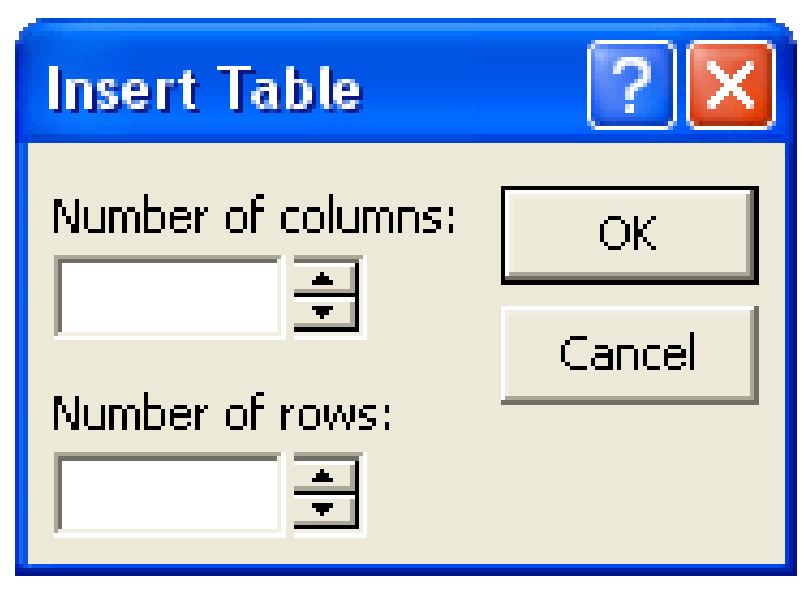
To insert the above given table in MS PowerPoint, write the minimum number of rows and columns in the given Insert Table dialog image (Number of columns:, Number of rows:). (1 Mark)
Diagram for Q.4c
Checking Hints (Marking Scheme • 2 Marks)
  • Part i: 1 mark for Ctrl + O.
  • Part ii: 1 mark for Number of columns: 4 and Number of rows: 5.
✓ BETTER RESPONSE (SOLVED MODEL ANSWER)Full Marks (2/2)
Part c: MS PowerPoint Open Shortcut & Insert Table Dimensions (2 Marks)
•i. Keyboard Shortcut to Open an MS PowerPoint File (1 Mark): `Ctrl + O`
•ii. Minimum Number of Columns and Rows in `Insert Table` Dialog (1 Mark):
•Number of columns: `4` (Student ID, Student Name, Class, Fee Paid)
•Number of rows: `5` (1 header row + 4 student data rows)
Q.5aConstructed Response Questions (CRQs)
2025 Syllabus Outcome (1.5.2): explain the following types of system software: a. operating system, b. device drivers, c. utility programs, d. language processors;
Question Text
Describe the purpose of each of the following:
i.Utility Software (1 Mark)
ii.User Interface (1 Mark)
Checking Hints (Marking Scheme • 2 Marks)
  • 1 mark for Utility Software purpose (configures, optimises, and analyses the computer system).
  • 1 mark for User Interface purpose (allows interaction/commands between user and machine).
✓ BETTER RESPONSE (SOLVED MODEL ANSWER)Full Marks (2/2)
Part a: Purpose of Utility Software and User Interface (2 Marks)
•i. Utility Software (1 Mark): System software used to configure, analyse, optimise, maintain, and protect the computer system (such as antivirus software, backup utilities, file archivers like WinRAR/WinZip, and disk defragmenters).
•ii. User Interface (1 Mark): The communication bridge between the user and the computer hardware/operating system that allows users to issue commands and interact with programs (e.g., CLI or GUI).
Q.5bConstructed Response Questions (CRQs)
Out of 2025 Syllabus3 Marks • Level A
Question Text
In disk operating system (DOS), users have to perform each task by using commands.
Write appropriate DOS commands to solve the given problems.
i.Change present working directory from C:\DOS to C:\GAMES\PACEM (1 Mark)
ii.Display the MS DOS version number on the screen of the monitor. (1 Mark)
iii.Delete a file named CAT.TMP from the TEST directory on drive C. (1 Mark)
Checking Hints (Marking Scheme • 3 Marks)
  • 1 mark for CD C:\GAMES\PACEM.
  • 1 mark for VER.
  • 1 mark for DEL C:\TEST\CAT.TMP.
✓ BETTER RESPONSE (SOLVED MODEL ANSWER)Full Marks (3/3)
Part b: MS-DOS Commands (3 Marks — 1 Mark Each)
•i. Change working directory from `C:\DOS` to `C:\GAMES\PACEM`:
Architecture / Topology Diagram
CD C:\GAMES\PACEM
•ii. Display the MS-DOS version number on the screen:
Architecture / Topology Diagram
VER
•iii. Delete file `CAT.TMP` from the `TEST` directory on drive `C`:
Architecture / Topology Diagram
DEL C:\TEST\CAT.TMP
Q.6aExtended Response Questions (ERQs)
2025 Syllabus Outcome (1.2.4): illustrate the Von Neumann Architecture using a block diagram;
Question Text
i.Describe the purpose of central processing unit (CPU), control unit (CU), memory unit (MU) and arithmetic logic unit (ALU) in a computer system? (4 Marks)
ii.Write any THREE advantages of using universal serial bus (USB) port over parallel port? (3 Marks)
Checking Hints (Marking Scheme • 7 Marks)
  • Part i: 1 mark each for describing CPU, Control Unit (CU), Memory Unit (MU), and Arithmetic Logic Unit (ALU) (4 Marks).
  • Part ii: 1 mark each for THREE advantages of USB port over parallel port (faster transfer, smaller/compact, plug-and-play, supplies power = 3 Marks).
✓ BETTER RESPONSE (SOLVED MODEL ANSWER)Full Marks (7/7)
Part a: CPU/Memory Units & USB vs Parallel Ports (7 Marks)
i. Purpose of CPU, Control Unit (CU), Memory Unit (MU), and Arithmetic Logic Unit (ALU) (4 Marks — 1 Mark Each):
•Central Processing Unit (CPU): The primary processing unit ('brain' of the computer) mounted on the motherboard that fetches, decodes, and executes program instructions and coordinates all connected subsystems.
•Control Unit (CU): Directs and coordinates the operations of the entire processor and computer system by interpreting instructions and issuing timing and control signals.
•Memory Unit (MU): Stores data, active program instructions, and intermediate/final processing results (comprising volatile RAM and non-volatile ROM).
•Arithmetic Logic Unit (ALU): Performs all mathematical operations (+, -, ×, ÷) and logical comparisons (<, >, =, AND, OR, NOT).
ii. THREE Advantages of Universal Serial Bus (USB) Port over Parallel Port (3 Marks — 1 Mark Each):
1.Much Higher Data Transfer Speed: USB interfaces (USB 2.0/3.0+) transfer data at hundreds of Mbps to multiple Gbps, far faster than legacy parallel printer ports.
2.Compact Size, Plug-and-Play & Hot-Swappable: USB connectors are compact and support automatic Plug-and-Play detection without restarting the computer.
3.Universal Device Support & Power Delivery: A single USB standard connects diverse peripherals (keyboards, mice, printers, cameras, smartphones, flash drives) and supplies electrical power/charging over the same cable.
Q.6bExtended Response Questions (ERQs)
2025 Syllabus Outcome (1.2.4): illustrate the Von Neumann Architecture using a block diagram;
Question Text
i.There are FIVE generations of computers till date. Name the major technologies used in third, fourth and fifth generation of computers? (3 Marks)
ii.Write any THREE advantages of using transistors instead of vacuum tubes in second generation of computers as major technology. (3 Marks)
iii.State the John von Neumann theory which became the basis of modern computer systems? (1 Mark)
Checking Hints (Marking Scheme • 7 Marks)
  • Part i: 1 mark each for 3rd generation = Integrated Circuits (IC), 4th generation = Microprocessor, 5th generation = Artificial Intelligence (AI) (3 Marks).
  • Part ii: 1 mark each for THREE advantages of transistors over vacuum tubes (smaller size, faster, less heat/power, do not burn out easily = 3 Marks).
  • Part iii: 1 mark for stating John von Neumann's stored-program theory (programs and data are stored together in main memory).
✓ BETTER RESPONSE (SOLVED MODEL ANSWER)Full Marks (7/7)
Part b: Computer Generations, Transistors vs Vacuum Tubes, & Von Neumann Theory (7 Marks)
i. Major Technologies Used in 3rd, 4th, and 5th Generation Computers (3 Marks — 1 Mark Each):
•Third Generation: Integrated Circuits (ICs) (SSI / MSI silicon chips)
•Fourth Generation: VLSI Microprocessors (Very Large Scale Integration)
•Fifth Generation: ULSI (Ultra Large Scale Integration) & Artificial Intelligence (AI) / Parallel Processing
ii. THREE Advantages of Transistors over Vacuum Tubes (3 Marks — 1 Mark Each):
1.Much Smaller Size: One tiny solid-state transistor replaced bulky glass vacuum tubes, drastically reducing computer size.
2.Faster Operating Speed & Higher Reliability: Transistors switch states much faster (microseconds) and do not have fragile filaments that burn out frequently.
3.Lower Power Consumption & Less Heat: Transistors consume far less electricity and generate much less heat than glowing vacuum tubes.
iii. John von Neumann Stored-Program Theory (1 Mark):
•John von Neumann proposed the Stored-Program Concept, which states that both program instructions and the data they operate on should be stored together in the same read/write main memory (RAM) in binary form so the CPU can fetch and execute instructions sequentially.
Q.7aExtended Response Questions (ERQs)
2025 Syllabus Outcome (1.5.3): describe the purpose of the following application software: a. word processor, b. spreadsheet, c. database management, d. presentation/ desktop publication, e. communication, f. entertainment;
Question Text
A family purchases three new PCs and installs an integrated software package which includes the features of word processing, spread sheet, presentation and database. Explain in detail how this integrated software package would help this family in performing different tasks. (8 Marks)
Checking Hints (Marking Scheme • 8 Marks)
  • 2 marks each for explaining how Word Processing, Spreadsheet, Presentation, and Database software help the family perform specific tasks (4 × 2 = 8 Marks).
✓ BETTER RESPONSE (SOLVED MODEL ANSWER)Full Marks (8/8)
Part a: How an Integrated Office Suite Helps a Family (8 Marks — 2 Marks per Software)
1.Word Processing Software (e.g., MS Word) (2 Marks):
•Helps family members type, edit, spell-check, and format school assignments, essays, resumes/CVs, formal letters, and household checklists.
2.Spreadsheet Software (e.g., MS Excel) (2 Marks):
•Helps parents track monthly household budgets, utility bills, income vs expenses, savings, and family business calculations using automated formulas (SUM, AVERAGE) and expense charts.
3.Presentation Software (e.g., MS PowerPoint) (2 Marks):
•Helps children and working parents create visual multimedia slide presentations with images, charts, and animations for school projects, university seminars, or office meetings.
4.Database Management Software (e.g., MS Access) (2 Marks):
•Helps the family or a home-based family business store, organise, search, and back up structured records such as customer contacts, inventory logs, medical records, or address books.
Q.7bExtended Response Questions (ERQs)
2025 Syllabus Outcome (1.5.1): compare system software and application software, highlighting their roles in a computer system;
Question Text
i.'Disc operating system (DOS) is almost replaced by the Windows.' Justify this replacement by providing any FIVE valid reasons. (5 Marks)
ii.System software and application software are TWO major types of software in computer system. Describe each type of software and give an example of system software. (3 Marks)
Checking Hints (Marking Scheme • 8 Marks)
  • Part i: 1 mark each for any FIVE valid reasons why Windows replaced DOS (5 Marks).
  • Part ii: 1 mark for describing System Software + 1 mark for describing Application Software + 1 mark for a valid example of System Software (e.g., MS Windows, DOS, Linux) (3 Marks).
✓ BETTER RESPONSE (SOLVED MODEL ANSWER)Full Marks (8/8)
Part b: Why Windows Replaced DOS (5M) & System vs Application Software (3M) (8 Marks)
i. FIVE Reasons Why Windows Replaced MS-DOS (5 Marks — 1 Mark Each):
1.Intuitive Graphical User Interface (GUI): Windows uses visual icons, menus, and windows (WIMP) instead of requiring users to memorise complex text commands on a black screen.
2.True Multitasking: Windows allows users to run multiple programs simultaneously in separate windows, whereas DOS runs only one program at a time.
3.Mouse & Touchscreen Navigation: Windows supports easy point-and-click mouse interaction, whereas DOS relies entirely on keyboard typing.
4.Automatic Plug and Play (PnP) Hardware Support: Windows automatically detects and installs drivers for new peripherals, unlike manual configuration in DOS.
5.Rich Multimedia & Networking Capabilities: Windows supports modern audio, high-definition video, colour graphics, printers, and internet/LAN networking out of the box.
ii. System Software vs Application Software (3 Marks):
•System Software (1 Mark): Software designed to control, manage, and coordinate computer hardware resources and provide a platform for running application software.
•Application Software (1 Mark): Software designed to help end-users perform specific productive, educational, or entertainment tasks (e.g., MS Word, MS Excel, web browsers).
•Example of System Software (1 Mark): Operating System (e.g., Microsoft Windows, Linux, macOS, MS-DOS), Device Drivers, or Utility Programs (Antivirus).