← Computer Science IX past papers

Computer Science IX · 2018 · E-Marking Notes (Questions & Solved Better Responses)

AGA KHAN UNIVERSITY EXAMINATION BOARD
Notes from E-Marking Centre on SSC-I Computer Science Annual Examinations 2018
Digital Edition: Questions, Marking Schemes & Solved Better Responses (2025 Syllabus Aligned)
Q.1Constructed Response Questions (CRQs)
Out of 2025 Syllabus5 Marks • Level K
Question Text
Names of some computing devices that were invented during the evolution of computer are given below:
•ENIAC • UNIVAC • Mark-1 • Abacus • Difference engine • Punch card tabulator • Analytical engine • Pascal's Pascaline calculator
Choose appropriate name from the list inside the box and write it with corresponding statement about a computing device. (Note: Only one name can be used for one statement.) (5 Marks)
i. _________________________ was steam powered, fully automatic and could print the results as well.
ii. _________________________ works on decimal arithmetic rather than binary arithmetic.
iii. _________________________ was a general purpose, fully program-controlled and automatic mechanical digital computer.
iv. _________________________ had a system of gears. One-tooth gear of this machine engages tooth with a ten-tooth gear once every time it revolves.
v. _________________________ processes data in numerical form using digital circuits.
Checking Hints (Marking Scheme • 5 Marks)
  • 1 mark for each correct computing device matched to its statement: i. Difference engine, ii. ENIAC, iii. Analytical engine, iv. Pascal's Pascaline calculator, v. Mark-1 (5 × 1 = 5 Marks).
✓ BETTER RESPONSE (SOLVED MODEL ANSWER)Full Marks (5/5)
i. `Difference engine` was steam powered, fully automatic and could print the results as well. (Invented by Charles Babbage in 1822)
ii. `ENIAC` works on decimal arithmetic rather than binary arithmetic. (Electronic Numerical Integrator and Computer)
iii. `Analytical engine` (or `Mark-1`) was a general purpose, fully program-controlled and automatic mechanical/electromechanical digital computer.
iv. `Pascal's Pascaline calculator` had a system of gears. One-tooth gear of this machine engages tooth with a ten-tooth gear once every time it revolves. (Invented by Blaise Pascal in 1642)
v. `Mark-1` (or `UNIVAC` / `ENIAC`) processes data in numerical form using digital circuits.
Q.2aConstructed Response Questions (CRQs)
2025 Syllabus Outcome (1.3.1): distinguish among the memory measuring units such as bits, bytes, kilobytes, megabytes, and gigabytes in computer memory;
Question Text
How many image files, of size 512 kilobytes each, can be stored on 1500 megabytes of a DVD? Show your working. (2 Marks)
Checking Hints (Marking Scheme • 2 Marks)
  • 1 mark for converting 1500 MB into KB (1500 × 1024 = 1,536,000 KB) or finding 2 files per MB.
  • 1 mark for dividing 1,536,000 / 512 = 3000 files.
✓ BETTER RESPONSE (SOLVED MODEL ANSWER)Full Marks (2/2)
Part a: Number of 512 KB Image Files on a 1500 MB DVD (2 Marks)
1.Convert DVD storage capacity from Megabytes (MB) to Kilobytes (KB):
1 MB=1024 KB1\text{ MB} = 1024\text{ KB}
1500 MB=1500×1024 KB=1,536,000 KB1500\text{ MB} = 1500 \times 1024\text{ KB} = 1,536,000\text{ KB}
2.Divide total capacity in KB by the size of each image file (512 KB512\text{ KB}):
Number of files=1,536,000 KB512 KB=3000 image files\text{Number of files} = \frac{1,536,000\text{ KB}}{512\text{ KB}} = 3000\text{ image files}
*(Alternative method: 1 MB=1024 KB1\text{ MB} = 1024\text{ KB} holds 1024512=2 files per MB\frac{1024}{512} = 2\text{ files per MB}, so 1500 MB×2=3000 files1500\text{ MB} \times 2 = 3000\text{ files}.)*
Q.2bConstructed Response Questions (CRQs)
2025 Syllabus Outcome (1.2.1): define various input and output devices, including keyboards, touchscreen, pointing devices, biometric scanners, sensors, recognition systems, audio devices, display screens, printers, plotters, cutters, and actuators;
Question Text
THREE types of events are performed by a mouse. Describe the purpose of these events: Left Click, Right Click, and Drag. (3 Marks)
Checking Hints (Marking Scheme • 3 Marks)
  • 1 mark each for describing the purpose of Left Click (select/open), Right Click (open pop-up context/properties menu), and Drag (move/reposition or group-select items while holding left button).
✓ BETTER RESPONSE (SOLVED MODEL ANSWER)Full Marks (3/3)
Part b: Purpose of Mouse Events (3 Marks — 1 Mark Each)
| Left Click | Right Click | Drag |
| :
Q.3aConstructed Response Questions (CRQs)
Out of 2025 Syllabus2 Marks • Level A
Question Text
Convert the given octal number into decimal number. Show your working. (2 Marks)
(65.4)8(65.4)_8
Checking Hints (Marking Scheme • 2 Marks)
  • 1 mark for positional expansion (6×81)+(5×80)+(4×8−1)(6 \times 8^1) + (5 \times 8^0) + (4 \times 8^{-1}).
  • 1 mark for final decimal value 48+5+0.5=53.548 + 5 + 0.5 = 53.5.
✓ BETTER RESPONSE (SOLVED MODEL ANSWER)Full Marks (2/2)
Part a: Octal (65.4)8(65.4)_8 to Decimal Conversion (2 Marks)
Multiply each octal digit by its positional power of 88 (81,808^1, 8^0 to the left of the radix point and 8−18^{-1} to the right):
(65.4)8=(6×81)+(5×80)+(4×8−1)(65.4)_8 = (6 \times 8^1) + (5 \times 8^0) + (4 \times 8^{-1})
(65.4)8=(6×8)+(5×1)+(4×18)(65.4)_8 = (6 \times 8) + (5 \times 1) + \left(4 \times \frac{1}{8}\right)
(65.4)8=48+5+0.5=(53.5)10(65.4)_8 = 48 + 5 + 0.5 = (53.5)_{10}
Q.3bConstructed Response Questions (CRQs)
Out of 2025 Syllabus3 Marks • Level A
Question Text
Show that binary addition of two numbers, (01000111)2(01000111)_2 and (01110100)2(01110100)_2, gives a result which is equal to 187187 in decimal number system. (3 Marks)
Checking Hints (Marking Scheme • 3 Marks)
  • 1.5 marks for correct binary addition yielding (10111011)2(10111011)_2.
  • 1.5 marks for converting (10111011)2(10111011)_2 into decimal (128+32+16+8+2+1=18710128 + 32 + 16 + 8 + 2 + 1 = 187_{10}) to prove equality.
✓ BETTER RESPONSE (SOLVED MODEL ANSWER)Full Marks (3/3)
Part b: Binary Addition & Decimal Verification (3 Marks)
**Step 1: Binary Addition of (01000111)2(01000111)_2 and (01110100)2(01110100)_2:**
```text
Carry: 1 1 1
0 1 0 0 0 1 1 1 (71 in decimal)
+ 0 1 1 1 0 1 0 0 (116 in decimal)
Q.4aConstructed Response Questions (CRQs)
Out of 2025 Syllabus2 Marks • Level A
Question Text
Asher wants to launch the start menu on his computer system which has Windows operating system installed but the mouse connected to his computer system is not working.
Mention any TWO ways in which Asher could launch the start menu without using the mouse. (2 Marks)
Checking Hints (Marking Scheme • 2 Marks)
  • 1 mark each for any TWO valid ways to open the Start Menu without a mouse (pressing the Windows key, pressing Ctrl + Esc, using laptop touchpad/trackball).
✓ BETTER RESPONSE (SOLVED MODEL ANSWER)Full Marks (2/2)
Part a: Launching Windows Start Menu Without a Mouse (2 Marks — 1 Mark Each)
1.Press the `Windows` logo key (Win) on the keyboard.
2.Press the `Ctrl + Esc` keyboard shortcut.
(Alternative valid answers: Use a laptop touchpad/trackball, touchscreen, or Windows Speech Recognition.)
Q.4bConstructed Response Questions (CRQs)
Out of 2025 Syllabus2 Marks • Level A
Question Text
Given is a list of change case options available in MS Word:
•Sentence case • Lowercase • Uppercase • Capitalize each word • Toggle case
Select appropriate change case option for each word from the given list and write it in the third column of the table. (2 Marks)
Before Applying Change CaseAfter Applying Change CaseChange Case Option Used
CompuTercOMPUtER
FLOPPYFloppy
Checking Hints (Marking Scheme • 2 Marks)
  • 1 mark for Toggle case (CompuTer -> cOMPUtER).
  • 1 mark for Sentence case or Capitalize each word (FLOPPY -> Floppy).
✓ BETTER RESPONSE (SOLVED MODEL ANSWER)Full Marks (2/2)
Part b: MS Word Change Case Options (2 Marks — 1 Mark Each)
| Before Applying Change Case | After Applying Change Case | Change Case Option Used |
| :
Q.4cConstructed Response Questions (CRQs)
Out of 2025 Syllabus2 Marks • Level A
Question Text
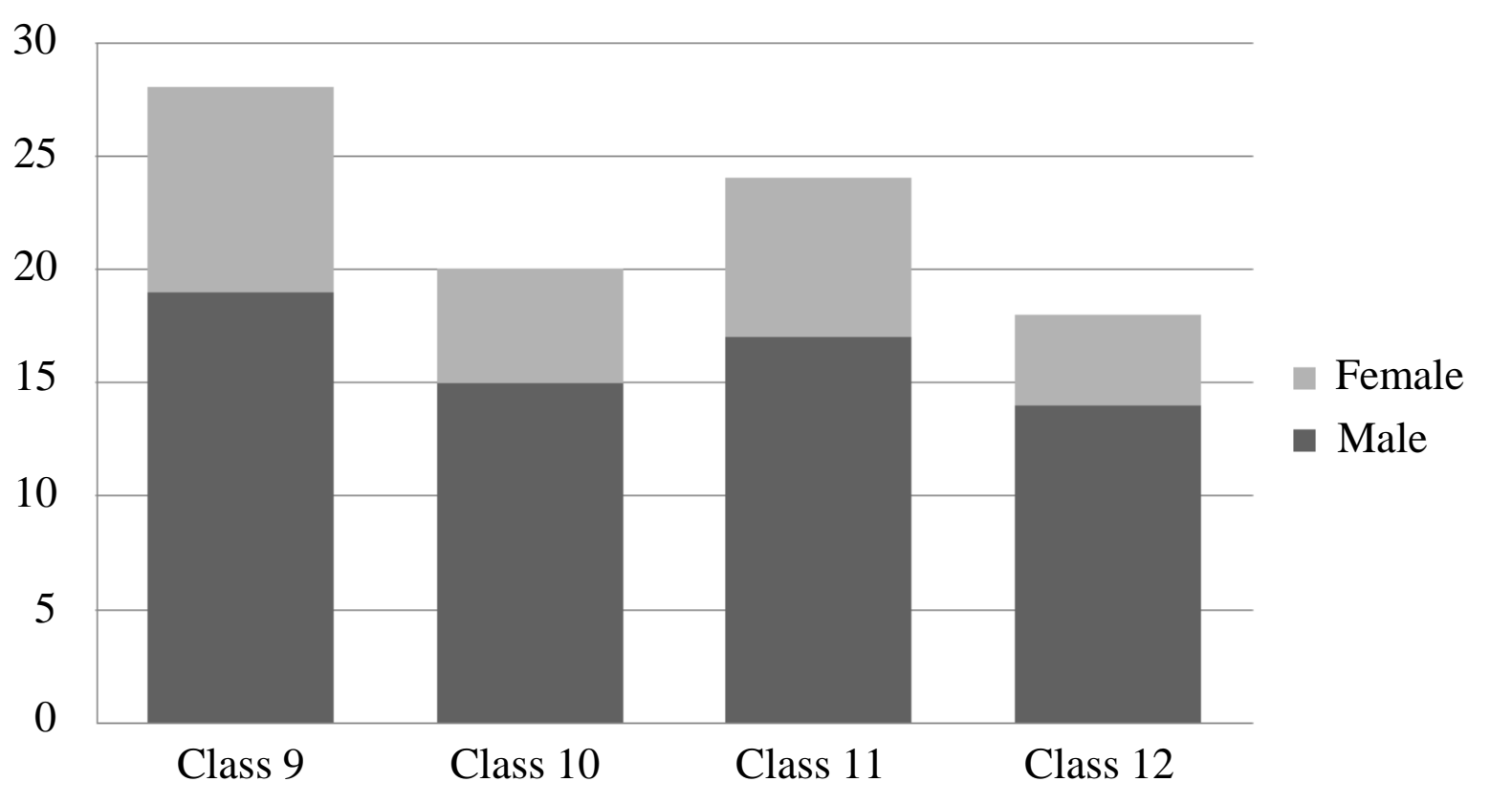
To insert any chart in MS PowerPoint, we enter data in the MS Excel file that should be depicted in the chart.
Complete the given MS Excel table by filling the shaded cells with reference to the given chart. (2 Marks)
Diagram for Q.4c
Checking Hints (Marking Scheme • 2 Marks)
  • 1 mark for writing Male and Female in the correct order in the top shaded column headers.
  • 1 mark for writing Class 9, Class 10, Class 11, and Class 12 in the left shaded row headers.
✓ BETTER RESPONSE (SOLVED MODEL ANSWER)Full Marks (2/2)
| :
Q.5aConstructed Response Questions (CRQs)
2025 Syllabus Outcome (1.5.2): explain the following types of system software: a. operating system, b. device drivers, c. utility programs, d. language processors;
Question Text
Define the following types of user interface:
i.Command Line Interface (CLI) (1 Mark)
ii.Graphical User Interface (GUI) (1 Mark)
Checking Hints (Marking Scheme • 2 Marks)
  • 1 mark for defining CLI (user types text commands via keyboard).
  • 1 mark for defining GUI (user interacts visually via icons, menus, windows, and mouse pointer).
✓ BETTER RESPONSE (SOLVED MODEL ANSWER)Full Marks (2/2)
Part a: Definitions of CLI and GUI (2 Marks)
•i. Command Line Interface (CLI) (1 Mark): A text-based user interface in which the user interacts with the operating system by typing explicit text commands using a keyboard at a command prompt (e.g., MS-DOS, UNIX shell).
•ii. Graphical User Interface (GUI) (1 Mark): A visual user interface in which the user interacts with the computer using graphical elements such as windows, icons, menus, and a pointing device/mouse (`WIMP`) (e.g., Microsoft Windows, macOS, Ubuntu Linux).
Q.5bConstructed Response Questions (CRQs)
Out of 2025 Syllabus2 Marks • Level K
Question Text
Define 'internal' and 'external' commands in DOS and give an example of any ONE of these. (2 Marks)
Checking Hints (Marking Scheme • 2 Marks)
  • 1.5 marks for defining Internal commands (reside in COMMAND.COM / RAM) and External commands (reside as separate .COM, .EXE, .BAT files on disk).
  • 0.5 mark for any ONE valid command example (e.g., CLS, DIR, CHKDSK).
✓ BETTER RESPONSE (SOLVED MODEL ANSWER)Full Marks (2/2)
Part b: Internal and External Commands in MS-DOS (2 Marks)
•Internal Commands: Commands that are built directly into the `COMMAND.COM` command interpreter and loaded into main memory (RAM) automatically when the computer boots. They execute immediately without needing a separate disk file.
•Examples: DIR, CLS, VER, MD, CD, COPY, DEL, TIME, DATE.
•External Commands: Commands that are NOT built into COMMAND.COM in RAM; instead, they reside on secondary storage (hard disk/floppy) as separate executable files (`.COM`, `.EXE`, or `.BAT`) and must be loaded from disk when executed.
•Examples: FORMAT, DISKCOPY, CHKDSK, DELTREE, XCOPY, EDIT.
Q.6aExtended Response Questions (ERQs)
Out of 2025 Syllabus8 Marks • Level U
Question Text
i.Differentiate among supercomputers, minicomputers and microcomputers on the basis of their size, computation speed, cost and use. (5 Marks)
ii.Write any THREE advantages of using integrated circuits (ICs) over transistors in third generation of computers. (3 Marks)
Checking Hints (Marking Scheme • 8 Marks)
  • Part i: 5 marks for comparing Supercomputers, Minicomputers, and Microcomputers across Size, Speed, Cost, and Use.
  • Part ii: 1 mark each for any THREE advantages of ICs over transistors (smaller size, less power, less heat, higher speed = 3 Marks).
✓ BETTER RESPONSE (SOLVED MODEL ANSWER)Full Marks (8/8)
Part a: Classification of Computers & Integrated Circuits vs Transistors (8 Marks)
i. Comparison of Supercomputers, Minicomputers, and Microcomputers (5 Marks):
| Factor | Supercomputers | Minicomputers | Microcomputers |
| :
Q.6bExtended Response Questions (ERQs)
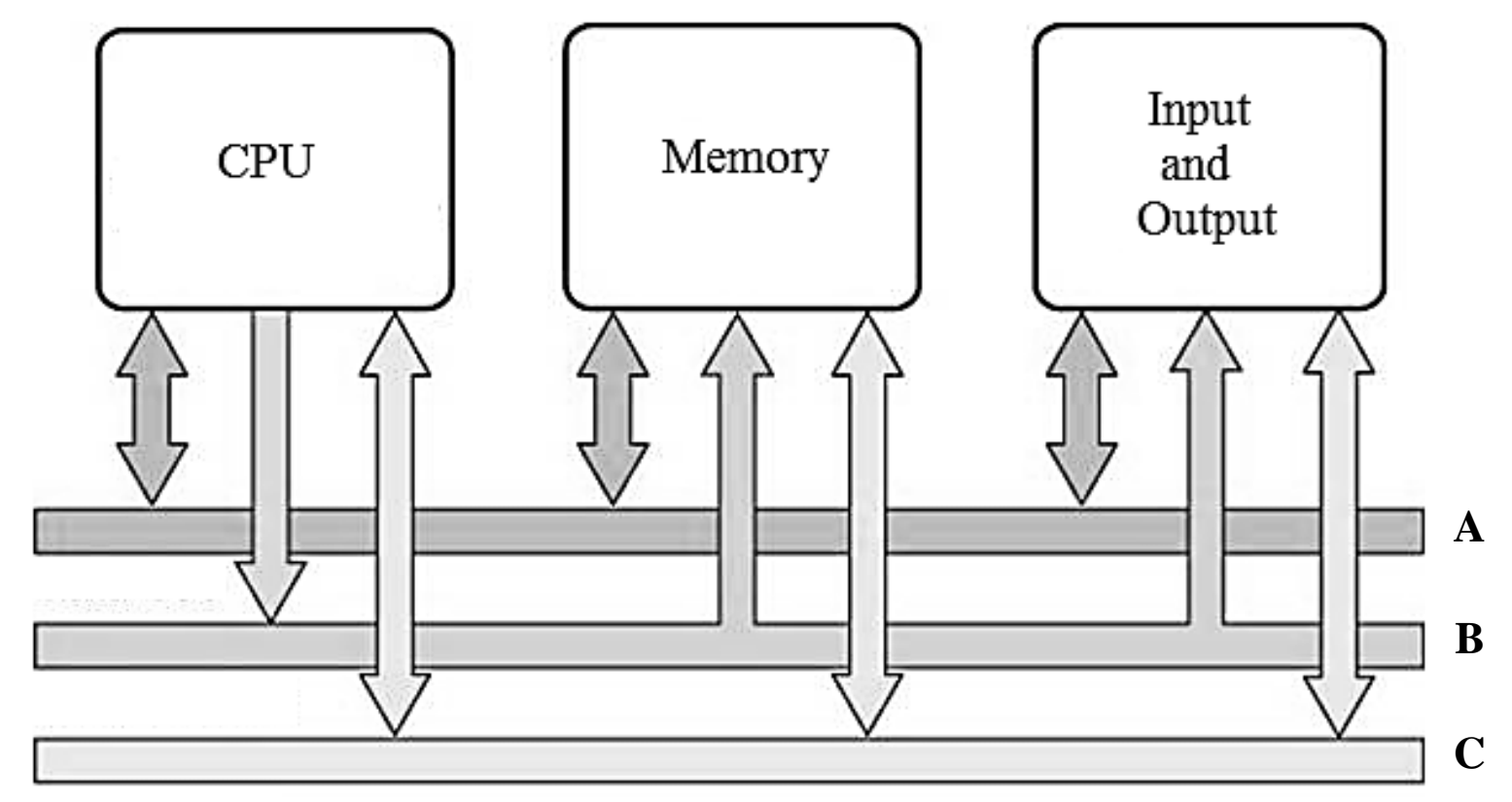
2025 Syllabus Outcome (1.2.5): illustrate the system bus and its types, including data bus, address bus and control bus, along with their roles in computer architecture using a diagram;
Question Text
i.The given image shows the system bus in a typical computer. Identify address bus, control bus and data bus (A, B, C) on the basis of connections shown among CPU, Memory and Input and Output units of a computer system. (3 Marks)
ii.Describe the following types of translators: Compiler, Interpreter, and Assembler. (3 Marks)
iii.Describe the role of RAM and ROM in computer. (2 Marks)
Diagram for Q.6b
Checking Hints (Marking Scheme • 8 Marks)
  • Part i: 1 mark each for A = Data Bus, B = Address Bus, and C = Control Bus (3 Marks).
  • Part ii: 1 mark each for describing Compiler (translates whole high-level program), Interpreter (translates high-level program line by line), and Assembler (translates assembly language to machine code) (3 Marks).
  • Part iii: 1 mark each for describing the role of RAM (volatile temporary working memory) and ROM (non-volatile permanent BIOS boot memory) (2 Marks).
✓ BETTER RESPONSE (SOLVED MODEL ANSWER)Full Marks (8/8)
| :
Q.7aExtended Response Questions (ERQs)
2025 Syllabus Outcome (1.5.3): describe the purpose of the following application software: a. word processor, b. spreadsheet, c. database management, d. presentation/ desktop publication, e. communication, f. entertainment;
Question Text
i.Identify any TWO application software that can help a teacher to improve his/ her routine tasks such as preparation of lecture, report cards, attendance registers and time table. (1 Mark)
ii.Describe THREE uses of each software identified in part (i). (6 Marks)
Checking Hints (Marking Scheme • 7 Marks)
  • Part i: 0.5 mark each for identifying TWO relevant application software (e.g., MS Excel, MS PowerPoint, MS Word = 1 Mark).
  • Part ii: 1 mark each for THREE teacher-specific uses of the first software (3 Marks) + 1 mark each for THREE teacher-specific uses of the second software (3 Marks).
✓ BETTER RESPONSE (SOLVED MODEL ANSWER)Full Marks (7/7)
Part a: Application Software for a Teacher's Routine Tasks (7 Marks)
i. TWO Application Software for a Teacher (1 Mark — 0.5 Mark Each):
1.Spreadsheet Software (e.g., Microsoft Excel / Google Sheets)
2.Presentation Software (e.g., Microsoft PowerPoint) or Word Processing Software (e.g., Microsoft Word)
ii. THREE Uses of Each Identified Software for a Teacher (6 Marks — 3 Marks Each):
•Uses of MS Excel (Spreadsheet Software) (3 Marks):
1.Automated Report Cards & Grading: Using built-in formulas (SUM, AVERAGE, IF, MIN, MAX) to automatically calculate student totals, percentages, and letter grades without manual calculation errors.
2.Attendance Registers: Maintaining daily/monthly student attendance sheets and automatically computing attendance percentages.
3.Class Timetables & Performance Charts: Organising structured rows and columns for class schedules and generating bar/pie charts to visualise class exam performance.
•Uses of MS PowerPoint (Presentation Software) (3 Marks):
1.Interactive Multimedia Lectures: Designing engaging slide decks with diagrams, images, audio/video clips, and animations to explain complex concepts visually.
2.Reusable Lesson Plans & Revision Summaries: Saving structured topic slides that can be updated and reused across academic terms or shared with students.
3.Visualising Data & Charts in Class: Embedding charts, tables, and SmartArt flowcharts to present topic breakdowns clearly on a projector.
Q.7bExtended Response Questions (ERQs)
2025 Syllabus Outcome (1.5.2): explain the following types of system software: a. operating system, b. device drivers, c. utility programs, d. language processors;
Question Text
Utility software is a type of system software used to support the computer infrastructure, distinguishing it from application software which is aimed at directly performing tasks that benefit ordinary users.
Explain the functionality of any FOUR utility software using appropriate examples. (7 Marks)
Checking Hints (Marking Scheme • 7 Marks)
  • 1 mark for naming four valid utility software examples + 1.5 marks each for explaining the functionality of FOUR utility programs (Antivirus, File Compression, Backup, Screen Saver / Disk Cleanup / Defragmenter = 7 Marks).
✓ BETTER RESPONSE (SOLVED MODEL ANSWER)Full Marks (7/7)
Part b: Functionality of FOUR Utility Software with Examples (7 Marks)
1.Antivirus Software (e.g., McAfee, Norton, Avira, Windows Defender): Scans hard drives, USB flash drives, and incoming downloads in real time to detect, quarantine, and remove malicious software (viruses, worms, trojans, spyware).
2.File Compression Utility (e.g., WinZip, WinRAR, 7-Zip): Compresses large files and folders into smaller archive packages (.zip, .rar) so they occupy less disk space and can be emailed or transferred faster.
3.Backup & Recovery Utility (e.g., Windows Backup, BackupMyPC, Acronis): Creates duplicate copies of important files, databases, and system images on external drives or cloud storage so data can be restored after accidental deletion or hardware failure.
4.Disk Defragmenter / Disk Cleanup Utility (e.g., Windows Defragmenter, CCleaner): Reorganises fragmented file clusters contiguously on a magnetic hard disk (and removes temporary junk files) to improve file access speed and free up storage space.