← Computer Science IX past papers

Computer Science IX · 2019 · E-Marking Notes (Questions & Solved Better Responses)

AGA KHAN UNIVERSITY EXAMINATION BOARD
Notes from E-Marking Centre on SSC-I Computer Science Annual Examinations 2019
Digital Edition: Questions, Marking Schemes & Solved Better Responses (2025 Syllabus Aligned)
Q.1aConstructed Response Questions (CRQs)
2025 Syllabus Outcome (1.6.3): describe the following types of language translators: a. compilers, b. interpreter, c. assembler;
Question Text
The given table shows the characteristics of TWO translators, i.e. compiler and interpreter.
Categorise each of these characteristics as that of a compiler or an interpreter. (2 Marks)
Characteristic of TranslatorCompiler / Interpreter
It produces an executable file of machine code.
It is used at testing/ development stage of a program.
It converts source code into machine code line by line.
It produces file that does not need any type of translator to run it.
Checking Hints (Marking Scheme • 2 Marks)
  • 0.5 mark for each correct categorisation: 1. Compiler, 2. Interpreter, 3. Interpreter, 4. Compiler (4 × 0.5 = 2 Marks).
✓ BETTER RESPONSE (SOLVED MODEL ANSWER)Full Marks (2/2)
Part a: Compiler vs Interpreter Categorisation (2 Marks — 0.5 Mark Each)
| Characteristic of Translator | Compiler / Interpreter |
| :
Q.1bConstructed Response Questions (CRQs)
2025 Syllabus Outcome (1.6.2): classify programming languages into low-level (machine and assembly) and high-level (procedural and object-oriented) languages;
Question Text
Define the following THREE types of programming languages: Machine Language, Assembly Language, and High-Level Language. (3 Marks)
Checking Hints (Marking Scheme • 3 Marks)
  • 1 mark each for defining Machine Language (binary 1s and 0s, directly understood by computer), Assembly Language (mnemonics/symbolic codes, uses assembler), and High-Level Language (English-like statements, machine-independent).
✓ BETTER RESPONSE (SOLVED MODEL ANSWER)Full Marks (3/3)
| :
Q.2aConstructed Response Questions (CRQs)
2025 Syllabus Outcome (1.3.1): distinguish among the memory measuring units such as bits, bytes, kilobytes, megabytes, and gigabytes in computer memory;
Question Text
There is a set of video files in which the size of each file is 64 megabytes (MBs). How many of these video files can be stored in a flash drive with the storage capacity of 1 gigabyte (GB)? Show your working. (2 Marks)
Checking Hints (Marking Scheme • 2 Marks)
  • 1 mark for converting 1 GB = 1024 MB.
  • 1 mark for dividing 1024 / 64 = 16 video files.
✓ BETTER RESPONSE (SOLVED MODEL ANSWER)Full Marks (2/2)
Part a: Number of 64 MB Video Files in a 1 GB Flash Drive (2 Marks)
1.Convert flash drive capacity from Gigabytes (GB) to Megabytes (MB):
1 GB=1024 MB1\text{ GB} = 1024\text{ MB}
2.Divide total storage capacity by the size of each video file:
Number of files=1024 MB64 MB=16 files\text{Number of files} = \frac{1024\text{ MB}}{64\text{ MB}} = 16\text{ files}
•Therefore, 16 video files of 64 MB each can be stored in a 1 GB flash drive.
Q.2bConstructed Response Questions (CRQs)
2025 Syllabus Outcome (1.2.1): define various input and output devices, including keyboards, touchscreen, pointing devices, biometric scanners, sensors, recognition systems, audio devices, display screens, printers, plotters, cutters, and actuators;
Question Text
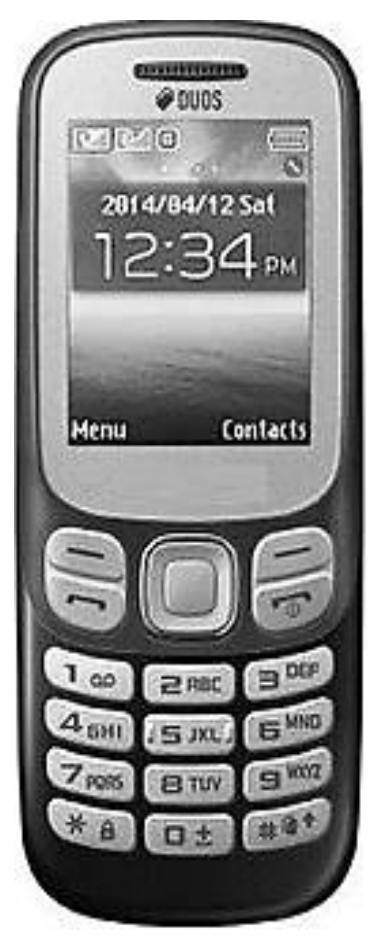
Identify and describe the purpose of TWO input and any ONE output components that are present in the mobile phone shown in the given picture. (3 Marks)
Diagram for Q.2b
Checking Hints (Marking Scheme • 3 Marks)
  • 1 mark each for identifying and describing TWO input components visible on the phone (Keypad and Microphone).
  • 1 mark for identifying and describing ONE output component visible on the phone (Display Screen or Speaker).
✓ BETTER RESPONSE (SOLVED MODEL ANSWER)Full Marks (3/3)
Part b: Input and Output Components of the Mobile Phone (3 Marks)
•Two Input Components (2 Marks — 1 Mark Each):
1.Keypad / Buttons: Used by the user to dial phone numbers, type text messages (SMS), and navigate through menus.
2.Microphone (Mic): Captures the user's spoken voice (sound waves) and converts it into electrical/digital audio signals during a phone call.
•One Output Component (1 Mark):
1.Display Screen / Monitor (LCD): Visually displays the time, date, menus, contacts, and text messages to the user.
2.(Alternative valid output) Speaker / Earpiece: Converts incoming electrical audio signals into audible sound so the user can hear the caller's voice or ringtones.
Q.3Constructed Response Questions (CRQs)
Out of 2025 Syllabus4 Marks • Level A
Question Text
A computer controlled car is programmed in such a way that it moves in different directions on receiving specific binary codes (numbers).
The binary codes with corresponding directions are given below.
Binary CodeDirection
1010Forward
0101Backward
1101Left
1011Right
In order to move the car, the operator uses the given hexadecimal digits: `5 B A D`
Determine the direction in which the car will move for each hexadecimal digit. (Note: Show your working.) (4 Marks)
Checking Hints (Marking Scheme • 4 Marks)
  • 1 mark for each correct hexadecimal-to-binary conversion and direction: 5 = 0101 (Backward), B = 1011 (Right), A = 1010 (Forward), D = 1101 (Left).
✓ BETTER RESPONSE (SOLVED MODEL ANSWER)Full Marks (4/4)
Step 1: Convert Each Hexadecimal Digit to 4-Bit Binary (Working)
•Hexadecimal `5` =510=(0101)2→= 5_{10} = (0101)_2 \rightarrow matches `Backward`
•Hexadecimal `B` =1110=8+2+1=(1011)2→= 11_{10} = 8 + 2 + 1 = (1011)_2 \rightarrow matches `Right`
•Hexadecimal `A` =1010=8+2=(1010)2→= 10_{10} = 8 + 2 = (1010)_2 \rightarrow matches `Forward`
•Hexadecimal `D` =1310=8+4+1=(1101)2→= 13_{10} = 8 + 4 + 1 = (1101)_2 \rightarrow matches `Left`
Step 2: Completed Direction Table
Hexadecimal Digit4-Bit Binary EquivalentDirection
`5`0101Backward
`B`1011Right
`A`1010Forward
`D`1101Left
Q.4aConstructed Response Questions (CRQs)
Out of 2025 Syllabus2 Marks • Level U
Question Text
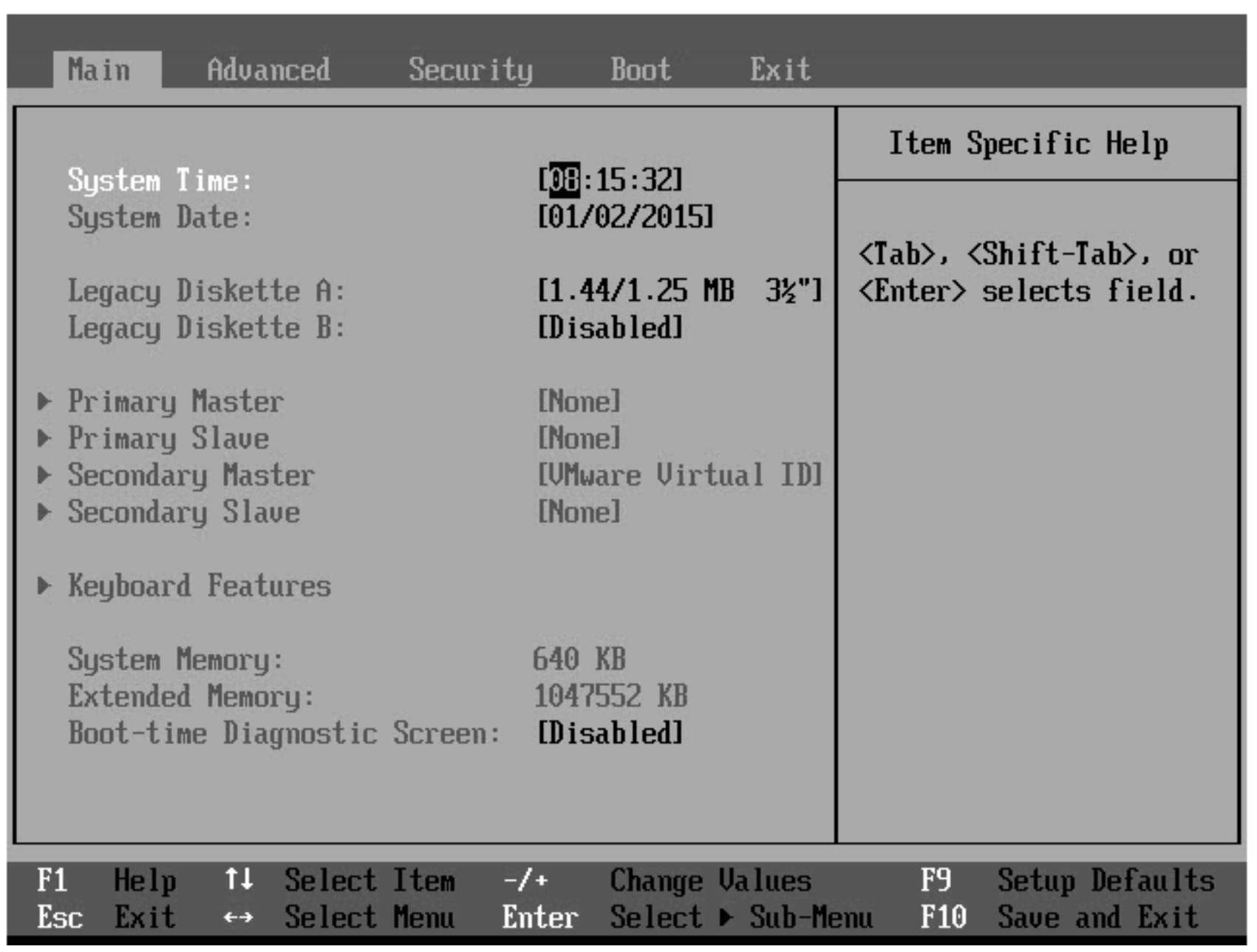
During installation of Windows operating system, Sheeraz opened the following screen.
i.Name the screen shown in the given image. (1 Mark)
ii.Give the reason for which he must open the screen shown in part (i). (1 Mark)
Diagram for Q.4a
Checking Hints (Marking Scheme • 2 Marks)
  • 1 mark for naming BIOS screen / Setup screen / Boot menu.
  • 1 mark for stating the reason: to change/set the booting device priority/sequence.
✓ BETTER RESPONSE (SOLVED MODEL ANSWER)Full Marks (2/2)
Part a: BIOS Setup Utility Screen (2 Marks)
•i. Name of the Screen (1 Mark): BIOS Setup Screen (or CMOS Setup Utility / Boot Setup / System Setup Screen).
•ii. Reason for Opening During Windows Installation (1 Mark): To change the boot device priority / boot sequence (e.g., setting the CD/DVD-ROM drive or bootable USB flash drive as the first boot device so the Windows installer starts).
Q.4bConstructed Response Questions (CRQs)
Out of 2025 Syllabus2 Marks • Level K
Question Text
List the names of any FOUR options that are available in the Insert menu of MS Word. (2 Marks)
Checking Hints (Marking Scheme • 2 Marks)
  • 0.5 mark for each valid option available in the Insert menu of MS Word (Any FOUR required = 2 Marks).
✓ BETTER RESPONSE (SOLVED MODEL ANSWER)Full Marks (2/2)
Part b: FOUR Options in the Insert Menu/Tab of MS Word (2 Marks — 0.5 Mark Each)
1.Table
2.Picture / Clip Art / Shapes / SmartArt / Chart
3.Header & Footer / Page Number
4.Hyperlink / Bookmark / Text Box / WordArt / Equation / Symbol / Page Break / Blank Page / Cover Page
Q.4cConstructed Response Questions (CRQs)
Out of 2025 Syllabus2 Marks • Level A
Question Text
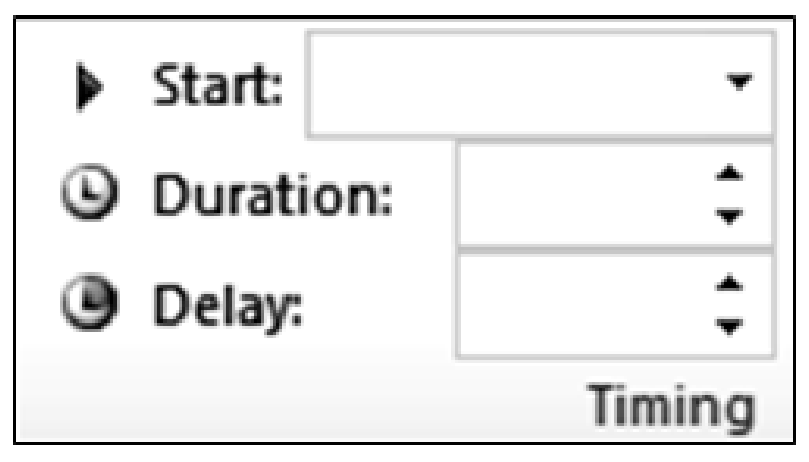
Shumaila is preparing an MS PowerPoint presentation and she has inserted animation on the text of one of the slides.
She wants the animation to appear 2 seconds after the click of the mouse and to stay on screen for 3 seconds. Complete the given picture with the THREE timing options of animation that would fulfil this requirement. (2 Marks)
Diagram for Q.4c
Checking Hints (Marking Scheme • 2 Marks)
  • 1 mark for Start: On Click / Mouse Click.
  • 0.5 mark for Duration: 3 (or 3 sec).
  • 0.5 mark for Delay: 2 (or 2 sec).
✓ BETTER RESPONSE (SOLVED MODEL ANSWER)Full Marks (2/2)
Part c: MS PowerPoint Animation Timing Settings (2 Marks)
| Timing Field | Required Setting |
| :
Q.5aConstructed Response Questions (CRQs)
2025 Syllabus Outcome (1.5.2): explain the following types of system software: a. operating system, b. device drivers, c. utility programs, d. language processors;
Question Text
Describe the purpose of each of the following:
i.Utility Software (1 Mark)
ii.User Interface (1 Mark)
Checking Hints (Marking Scheme • 2 Marks)
  • 1 mark for describing the purpose of Utility Software (analyses, configures, optimises, maintains, and protects the system).
  • 1 mark for describing the purpose of User Interface (allows a user to interact/communicate with the computer system).
✓ BETTER RESPONSE (SOLVED MODEL ANSWER)Full Marks (2/2)
Part a: Purpose of Utility Software and User Interface (2 Marks)
•i. Utility Software (1 Mark): System software designed to analyse, configure, optimise, maintain, and protect a computer system and its operating system (for example, antivirus scanners, disk defragmenters, backup utilities, and file compression tools).
•ii. User Interface (1 Mark): The visual or text-based bridge/medium through which a user interacts and communicates with the computer system and operating system (e.g., Command Line Interface [CLI] or Graphical User Interface [GUI]).
Q.5bConstructed Response Questions (CRQs)
Out of 2025 Syllabus3 Marks • Level A
Question Text
In disk operating system (DOS), users have to perform each task by using commands.
Write appropriate DOS commands to perform the given tasks.
i.Change present working directory from C:\DOS to C:\GAMES\PACEM (1 Mark)
ii.Display the DOS version number on the screen of the monitor. (1 Mark)
iii.Delete a file named CAT.TMP from the TEST directory on drive C. (1 Mark)
Checking Hints (Marking Scheme • 3 Marks)
  • 1 mark for CD C:\Games\PACEM.
  • 1 mark for VER.
  • 1 mark for DEL C:\TEST\CAT.TMP.
✓ BETTER RESPONSE (SOLVED MODEL ANSWER)Full Marks (3/3)
Part b: MS-DOS Commands (3 Marks — 1 Mark Each)
•i. Change working directory from `C:\DOS` to `C:\GAMES\PACEM`:
Architecture / Topology Diagram
CD C:\GAMES\PACEM
•ii. Display the DOS version number on the screen:
Architecture / Topology Diagram
VER
•iii. Delete file `CAT.TMP` from the `TEST` directory on drive `C`:
Architecture / Topology Diagram
DEL C:\TEST\CAT.TMP
Q.6aExtended Response Questions (ERQs)
2025 Syllabus Outcome (1.6.2): classify programming languages into low-level (machine and assembly) and high-level (procedural and object-oriented) languages;
Question Text
i.Following are the codes to perform the addition of numbers:
I.ADD 105, 100
II.105 + 100
III.0001 0001 0000 0101
Identify whether each of the given code lines is a machine code, an assembly language code or a high level language code. (2 Marks)
ii.Which of the codes, I, II and III, given in part (i) does not require any kind of translator? (1 Mark)
iii.Differentiate between the first generation computers and fourth generation computers on the basis of the given factors: Programming Language Used, Cost, Technology Used, and Speed. (4 Marks)
Checking Hints (Marking Scheme • 7 Marks)
  • Part i: 2 marks for identifying I = Assembly language code, II = High-level language code, III = Machine code.
  • Part ii: 1 mark for identifying Code III (Machine code) as not requiring any translator.
  • Part iii: 1 mark for each factor comparing 1st Generation vs 4th Generation computers (Programming Language Used, Cost, Technology Used, Speed = 4 Marks).
✓ BETTER RESPONSE (SOLVED MODEL ANSWER)Full Marks (7/7)
Part a: Programming Languages & Generations of Computers (7 Marks)
i. Identification of Code Lines (2 Marks):
•I (`ADD 105, 100`): Assembly Language Code (uses the mnemonic `ADD`)
•II (`105 + 100`): High-Level Language Code (standard mathematical expression)
•III (`0001 0001 0000 0101`): Machine Code / Machine Language (binary `0`s and `1`s)
ii. Code That Does Not Require Any Translator (1 Mark):
•Code III (`0001 0001 0000 0101` — Machine Code) does not require any translator because it is already in binary form directly executed by the CPU.
iii. First Generation vs Fourth Generation Computers (4 Marks):
| Factor | First Generation Computers | Fourth Generation Computers |
| :
Q.6bExtended Response Questions (ERQs)
2025 Syllabus Outcome (1.2.4): illustrate the Von Neumann Architecture using a block diagram;
Question Text
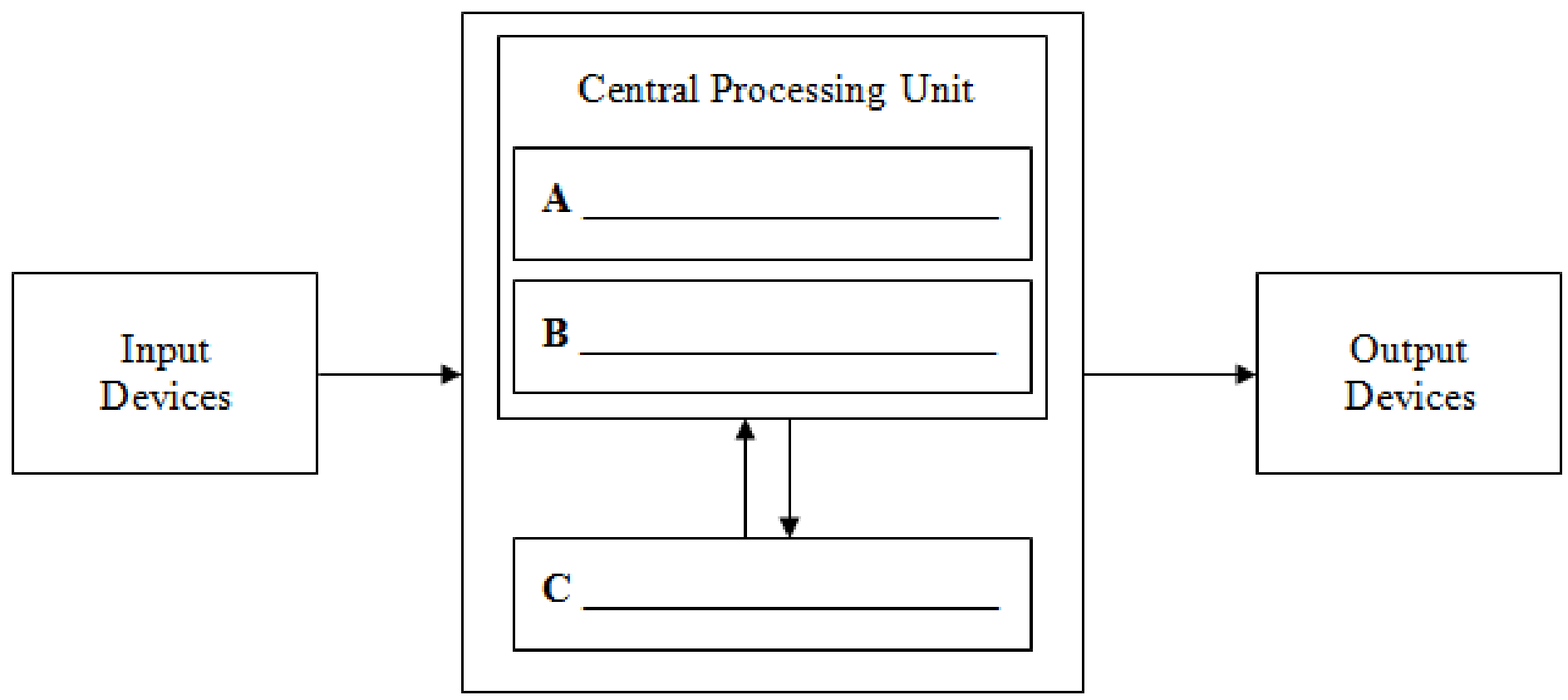
i.Complete the given diagram of the computer architecture by writing the names of components in boxes A, B and C. (3 Marks)
ii.Describe the function of each component named in part (i). (3 Marks)
iii.Write any ONE difference between data bus and address bus. (1 Mark)
Diagram for Q.6b
Checking Hints (Marking Scheme • 7 Marks)
  • Part i: 1 mark each for A = Arithmetic Logic Unit (ALU), B = Control Unit (CU), and C = Memory Unit / Primary Memory (3 Marks).
  • Part ii: 1 mark each for describing the function of ALU, Control Unit, and Memory Unit (3 Marks).
  • Part iii: 1 mark for ONE valid difference between Data Bus (carries data bidirectionally) and Address Bus (carries memory addresses from CPU).
✓ BETTER RESPONSE (SOLVED MODEL ANSWER)Full Marks (7/7)
| :
Q.7aExtended Response Questions (ERQs)
2025 Syllabus Outcome (1.5.2): explain the following types of system software: a. operating system, b. device drivers, c. utility programs, d. language processors;
Question Text
i.Describe any FOUR advantages of using Windows operating system as compared to DOS. (4 Marks)
ii.Describe any FOUR disadvantages of using Windows operating system as compared to DOS. (4 Marks)
Checking Hints (Marking Scheme • 8 Marks)
  • Part i: 1 mark for each valid advantage of Windows over DOS (Any FOUR required = 4 Marks).
  • Part ii: 1 mark for each valid disadvantage of Windows over DOS (Any FOUR required = 4 Marks).
✓ BETTER RESPONSE (SOLVED MODEL ANSWER)Full Marks (8/8)
Part a: Windows OS (GUI) vs MS-DOS (CLI) (8 Marks)
i. FOUR Advantages of Windows Operating System over DOS (4 Marks — 1 Mark Each):
1.Intuitive Graphical User Interface (GUI): Windows uses visual icons, menus, windows, and a mouse pointer (WIMP), so users do not need to memorise complex text commands as in DOS.
2.Multitasking & Multi-User Support: Windows can run multiple applications simultaneously in separate windows, whereas DOS is a single-user, single-tasking system.
3.Plug and Play (PnP) Hardware Support: Windows automatically detects and configures newly connected hardware peripherals, whereas DOS requires manual driver configuration.
4.Rich Multimedia & Networking Support: Windows natively supports high-resolution graphics, audio/video playback, drag-and-drop file sharing, and modern networking.
ii. FOUR Disadvantages of Windows Operating System over DOS (4 Marks — 1 Mark Each):
1.Higher Hardware & Memory Requirements: Windows requires gigabytes of RAM, fast multi-core processors, and tens of gigabytes of disk space, whereas DOS runs in a few megabytes.
2.Higher Licensing Cost: Commercial Windows licences are more expensive than lightweight command-line systems.
3.Greater Vulnerability to Malware/Viruses: Due to its widespread use and background network services, Windows is targeted far more frequently by viruses and malware.
4.Longer Installation & Boot Time / Slower Scripting: Installing and booting full graphical Windows takes longer than booting a minimal DOS prompt.
Q.7bExtended Response Questions (ERQs)
Out of 2025 Syllabus8 Marks • Level U
Question Text
i. In the given table, name the DOS command which fulfils each purpose. Identify each command as external or internal. (4 Marks)
Purpose of CommandDOS CommandType of Command
This command copies the contents of one floppy from the source drive to a formatted or un-formatted floppy disk in the destination drive.
This command is used to check a disk and display a status report with properties of disk like serial number, volume label, memory and other properties along with errors on the disk if any.
This command is used to remove a directory along with its contents.
ii. In the given table, write the purpose of each given DOS command. Identify each command as external or internal. (4 Marks)
DOS CommandPurpose of CommandType of Command
MD
VER
CLS
Checking Hints (Marking Scheme • 8 Marks)
  • Part i: 1 mark each for naming DISKCOPY, CHKDSK, and DELTREE (3 Marks) + 1 mark for identifying all three as External commands (4 Marks total).
  • Part ii: 1 mark each for the purpose of MD (make new directory), VER (display DOS version), and CLS (clear screen) (3 Marks) + 1 mark for identifying all three as Internal commands (4 Marks total).
✓ BETTER RESPONSE (SOLVED MODEL ANSWER)Full Marks (8/8)
Part b: MS-DOS Internal and External Commands (8 Marks)
i. Identifying DOS Commands from Purpose (4 Marks):
| Purpose of Command | DOS Command | Type of Command |
| :