← Computer Science IX past papers

Computer Science IX · 2025 · E-Marking Notes (Questions & Solved Better Responses)

AGA KHAN UNIVERSITY EXAMINATION BOARD
Notes from E-Marking Centre on SSC-I Computer Science Annual Examinations 2025
Digital Edition: Questions, Marking Schemes & Solved Better Responses (2025 Syllabus Aligned)
Q.1Constructed Response Questions (CRQs)
2025 Syllabus Outcome (1.5.2): explain the following types of system software: a. operating system, b. device drivers, c. utility programs, d. language processors;
Question Text
Differentiate command line interface (CLI) and graphical user interface (GUI) on the basis of the given aspects.
AspectCLIGUI
Style of Interaction
Use of Resource
Feedback on Error
Accessibility
Checking Hints (Marking Scheme • 4 Marks)
  • 1 mark for each correct difference across the 4 specified aspects: Style of Interaction, Use of Resource, Feedback on Error, and Accessibility (FOUR required).
✓ BETTER RESPONSE (SOLVED MODEL ANSWER)Full Marks (4/4)
AspectCommand Line Interface (CLI)Graphical User Interface (GUI)
Style of InteractionUser interacts by typing text-based commands via the keyboard at a command prompt.User interacts visually by clicking icons, menus, windows, and buttons using a mouse or touchscreen.
Use of ResourceConsumes very little system memory (RAM) and CPU processing power; requires only a keyboard and basic display.Consumes significantly more system memory (RAM), GPU/CPU resources, and uses pointing devices (mouse/touchscreen).
Feedback on ErrorDisplays text-based syntax or command error messages directly in the terminal lines.Displays visual pop-up dialog boxes, alert icons, or sound prompts when an error occurs.
AccessibilityLess accessible for beginners because users must memorise exact command syntax and parameters.Highly accessible and user-friendly for beginners because visual icons and menus are intuitive.
Q.2Constructed Response Questions (CRQs)
Out of 2025 Syllabus2 Marks • Level U
Question Text
Write any TWO features of analog signals.
Checking Hints (Marking Scheme • 2 Marks)
  • 1 mark for writing each correct feature of analog signals (any TWO required).
✓ BETTER RESPONSE (SOLVED MODEL ANSWER)Full Marks (2/2)
Features of Analog Signals (Any TWO — 2 Marks):
1.Continuous Wave Form: An analog signal is a continuous wave (sine wave) that changes smoothly over time and can take an infinite number of values within a given range.
2.Represents Physical Quantities: It directly represents natural physical quantities such as sound waves, temperature, light intensity, and atmospheric pressure, characterised by continuous amplitude and frequency.
Q.3Constructed Response Questions (CRQs)
2025 Syllabus Outcome (1.9.2): explain different types of computer networks, i.e., Local Area Network (LAN), Wide Area Network (WAN), and Metropolitan Area Network (MAN), highlighting their characteristics and applications;
Question Text
Compare Wide Area Network (WAN) with Local Area Network (LAN) by giving any TWO disadvantages of WAN.
Checking Hints (Marking Scheme • 2 Marks)
  • 1 mark for comparing WAN with LAN through each disadvantage (Any TWO required).
✓ BETTER RESPONSE (SOLVED MODEL ANSWER)Full Marks (2/2)
Disadvantages of WAN Compared to LAN (Any TWO — 2 Marks):
1.Higher Setup & Maintenance Cost: A WAN is significantly more expensive to set up and maintain than a LAN because it spans cities/countries and requires leased telecommunication lines, routers, or satellite links.
2.Higher Latency & Lower Data Transfer Speed: Due to vast geographical distances and multiple intermediate hops, WANs experience higher propagation delay (latency), lower effective bandwidth, and greater security/administration complexity than a local LAN.
Q.4Constructed Response Questions (CRQs)
2025 Syllabus Outcome (3.4.1): write HTML code to create: a. ordered list, b. unordered list, c. definition list;
Question Text
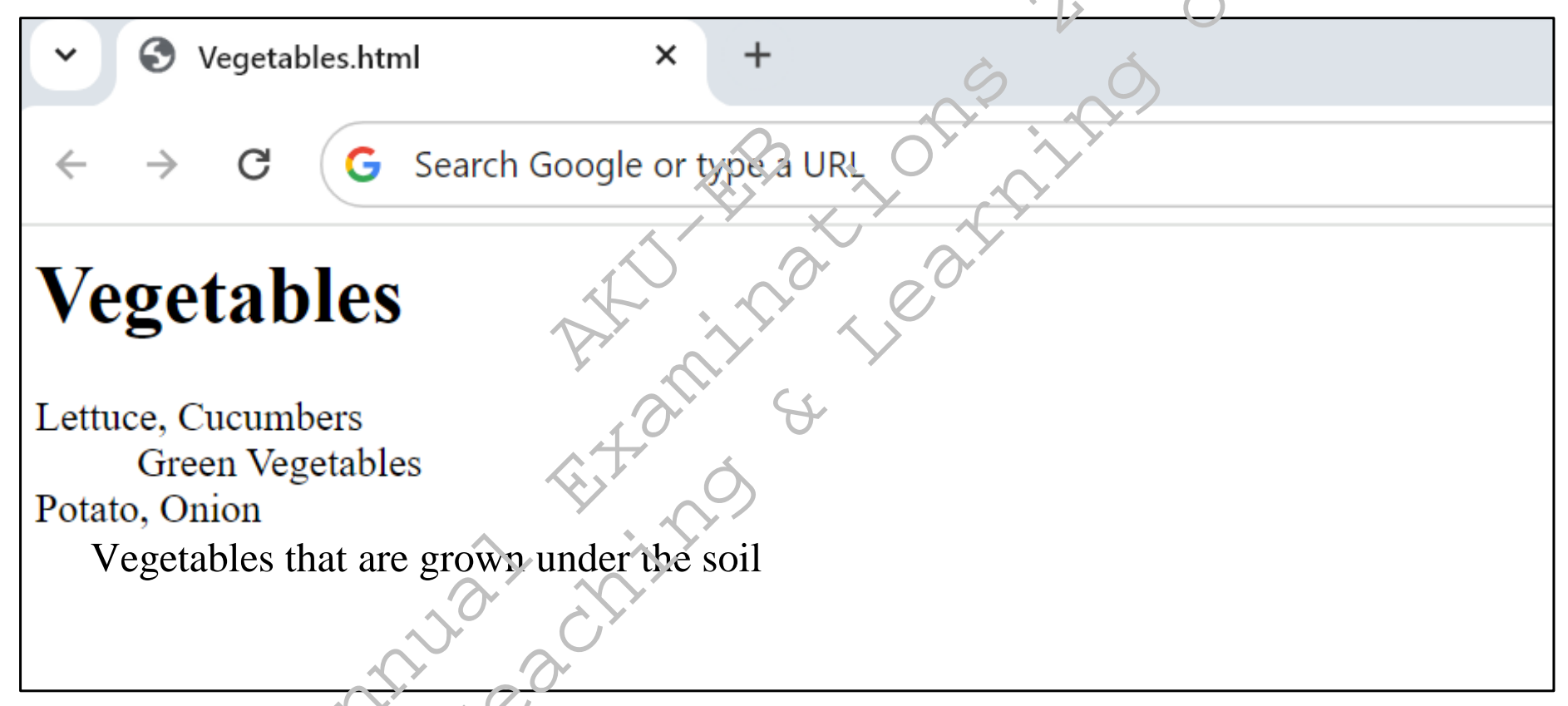
Consider the given image of a web page.
Write the HTML code to display the web page shown in the given image.
Diagram for Q.4
Checking Hints (Marking Scheme • 5 Marks)
  • 1 mark for <html> and </html> tags
  • 1 mark for <body> and </body> tags
  • 1 mark for <dl> and </dl> tag in the correct place
  • 1 mark for <dt> and </dt> tag in the correct place
  • 1 mark for <dd> and </dd> tag in the correct place
✓ BETTER RESPONSE (SOLVED MODEL ANSWER)Full Marks (5/5)
HTMLSource Code
<html>
<head>
    <title>Vegetables.html</title>
</head>
<body>
    <h1>Vegetables</h1>
    <dl>
        <dt>Lettuce, Cucumbers</dt>
        <dd>Green Vegetables</dd>
        <dt>Potato, Onion</dt>
        <dd>Vegetables that are grown under the soil</dd>
    </dl>
</body>
</html>
Q.5aExtended Response Questions (ERQs)
2025 Syllabus Outcome (1.2.3): describe primary and secondary storage devices based on location, cost, capacity, access time, data processing method, and storage technology such as semiconductor (SSD), magnetic (HDD), and optical;
Question Text
i.Compare primary and secondary storage devices based on their location with respect to the Central Processing Unit (CPU). (2 Marks)
ii.Discuss the function of primary and secondary storage devices for data processing in real-time scenarios. (4 Marks)
Checking Hints (Marking Scheme • 6 Marks)
  • 1 mark for writing each location comparison (TWO required).
  • 1 mark for each highlighted point on real-time processing vs permanent storage function (FOUR required).
✓ BETTER RESPONSE (SOLVED MODEL ANSWER)Full Marks (6/6)
i. Location with Respect to CPU (2 Marks):
•Primary Storage (RAM/ROM): Located directly on the motherboard close to the CPU and accessed directly via the system bus.
•Secondary Storage (SSD/HDD/USB): Located farther from the CPU via I/O controllers or external ports and accessed indirectly by loading data into RAM first.
ii. Function in Real-Time Data Processing (4 Marks):
•Primary Storage: Stores currently active instructions and live incoming data streams for immediate, high-speed CPU retrieval and real-time manipulation.
•Secondary Storage: Provides non-volatile, long-term archival storage for saving processed files, applications, and datasets permanently after processing.
Q.5bExtended Response Questions (ERQs)
2025 Syllabus Outcome (1.2.1): define various input and output devices, including keyboards, touchscreen, pointing devices, biometric scanners, sensors, recognition systems, audio devices, display screens, printers, plotters, cutters, and actuators;
Question Text
i.Explain the differences between impact and non-impact printers with TWO examples. (3 Marks)
ii.Give ONE advantage of using laser printers in a modern office environment, focusing on speed, print quality, and operational costs each. (3 Marks)
Checking Hints (Marking Scheme • 6 Marks)
  • 1 mark for comparing the difference between impact and non-impact printers (ONE required).
  • 1 mark for writing each example (TWO required).
  • 1 mark for writing each laser printer advantage on speed, print quality, and operational cost (THREE required).
✓ BETTER RESPONSE (SOLVED MODEL ANSWER)Full Marks (6/6)
i. Impact vs. Non-Impact Printers & Examples (3 Marks):
•Difference: Impact printers physically strike an inked ribbon against paper using pins/hammers (noisy and slower), whereas non-impact printers form characters without physical contact using laser toner or ink spray (quiet and fast).
•Examples: Impact = Dot-Matrix Printer, Daisy-Wheel Printer; Non-Impact = Laser Printer, Inkjet Printer.
ii. Advantages of Laser Printers in a Modern Office (3 Marks):
•Speed: Prints entire pages rapidly (20–60+ pages per minute) for high-volume office tasks.
•Print Quality: Produces crisp, high-resolution (600–2400 DPI) smudge-free text and graphics.
•Operational Costs: Offers a low cost per page in bulk office printing because a single toner cartridge yields thousands of pages.
Q.6aExtended Response Questions (ERQs)
2025 Syllabus Outcome (1.9.3): explain guided media and unguided media;
Question Text
i.Write TWO differences between guided (wired) and unguided (wireless) media. (2 Marks)
ii.Describe any TWO examples of guided media. (4 Marks)
Checking Hints (Marking Scheme • 6 Marks)
  • 1 mark for each complete difference (Any TWO required).
  • 1 mark for each statement in each guided media description (Any TWO statements required for each of TWO examples = 4 Marks).
✓ BETTER RESPONSE (SOLVED MODEL ANSWER)Full Marks (6/6)
i. Two Differences between Guided and Unguided Media (2 Marks):
1.Signal Path: Guided media transmits signals through a solid physical cable/conductor, whereas unguided media transmits electromagnetic waves through air/free space.
2.Topology & Security: Guided media provides a directed point-to-point connection with higher security against eavesdropping, whereas unguided media broadcasts signals over an area and is more prone to interference.
ii. Two Examples of Guided Media (4 Marks):
1.Twisted-Pair Cable (2 Marks): Consists of pairs of insulated copper wires twisted together to cancel electromagnetic interference; available as Unshielded (UTP) and Shielded (STP) for Ethernet LANs.
2.Fibre-Optic Cable (2 Marks): Uses a glass/plastic core surrounded by cladding to transmit data as light pulses via total internal reflection at gigabit speeds.
Q.6bExtended Response Questions (ERQs)
Out of 2025 Syllabus6 Marks • Level U
Question Text
i.Define network topology. (1 Mark)
ii.Give any FOUR benefits of using ring topology as compared to other topologies (bus, star, mesh). (4 Marks)
iii.Draw the diagram of ring topology. (1 Mark)
Checking Hints (Marking Scheme • 6 Marks)
  • 1 mark for defining network topology.
  • 1 mark for writing each benefit of ring topology (FOUR required).
  • 1 mark for drawing an accurate closed-loop diagram of ring topology.
✓ BETTER RESPONSE (SOLVED MODEL ANSWER)Full Marks (6/6)
i. Definition (1 Mark): Network topology is the physical or logical layout/arrangement of interconnected nodes and cables in a computer network.
ii. Four Benefits of Ring Topology (4 Marks):
1.Requires no central hub, switch, or server to manage connectivity (cheaper than star topology).
2.Uses significantly less cabling than mesh topology since each node only connects to two neighbours.
3.Unidirectional token-passing data flow prevents packet collisions common in bus topology.
4.Every node gets equal access to transmit data without bandwidth monopolisation.
iii. Ring Topology Diagram (1 Mark):
•Closed circular cable loop connecting Node 1 →\rightarrow Node 2 →\rightarrow Node 3 →\rightarrow Node 4 →\rightarrow Node 1.