AKU-EBClass IX (SSC Part I)CHAPTER-WISE CRQS • SHORT RESPONSE

Computer Science — Chapter-Wise Constructed Response Questions (CRQs)

Master 2–3 mark short-answer conceptual questions from 2024 & 2025 Annual Examination Paper II, Model Paper II, and the 2025 syllabus, complete with Checking Hints rubrics, model solutions, and authentic E-Marking candidate scripts.

Back to Computer Science Subject Hub

Select a Chapter (or Browse All Below)

Click any unit card to filter to that specific chapter, or use the search bar to find any concept, formula, or SLO code.

UNIT 1 • 3 SHORT QUESTIONS (CRQS)

Unit 1: The Computer System

2025 Syllabus Outcome (1.5.2): explain the following types of system software: a. operating system, b. device drivers, c. utility programs, d. language processors;
Differentiate command line interface (CLI) and graphical user interface (GUI) on the basis of the given aspects.
AspectCLIGUI
Style of Interaction
Use of Resource
Feedback on Error
Accessibility
📋 Official Checking Hints (Marking Rubric • 4 Marks)
  • 1 mark for correct differentiation on Style of Interaction (typing text commands vs clicking icons/menus).
  • 1 mark for correct differentiation on Use of Resource (low memory/keyboard-only vs higher RAM/CPU and mouse/I-O devices).
  • 1 mark for correct differentiation on Feedback on Error (text command error lines vs visual pop-up dialogs/alerts).
  • 1 mark for correct differentiation on Accessibility (less accessible/requires memorising commands vs highly accessible/intuitive visual icons).
✓ MODEL SOLUTION (Full Marks Guidance)
AspectCommand Line Interface (CLI)Graphical User Interface (GUI)
Style of InteractionUser interacts by typing text-based commands via the keyboard at a command prompt.User interacts visually by clicking icons, menus, windows, and buttons using a mouse or touchscreen.
Use of ResourceConsumes very little system memory (RAM) and CPU processing power; requires only a keyboard and basic display.Consumes significantly more system memory (RAM), GPU/CPU resources, and uses pointing devices (mouse/touchscreen).
Feedback on ErrorDisplays text-based syntax or command error messages directly in the terminal lines.Displays visual pop-up dialog boxes, alert icons, or sound prompts when an error occurs.
AccessibilityLess accessible for beginners because users must memorise exact command syntax and parameters.Highly accessible and user-friendly for beginners because visual icons and menus are intuitive.

Examiner Commentary (Better Responses): In better responses, candidates showed a clear understanding of the concept and wrote accurate points for each aspect: CLI by typing commands vs GUI by clicking on the interface; fewer vs more hardware/memory resources; error feedback through command text vs visual pop-ups; and CLI being less accessible for novices while GUI is more accessible.

⚠ WEAKER RESPONSE (Common Misconceptions & Lost Marks)
In weaker responses, candidates mixed up CLI and GUI in the style of interaction, gave vague terms in the use of resources (e.g., 'they use RAM and ROM'), and wrote unclear points on feedback and accessibility without highlighting key differences.
Examiner Suggestion for Improvement: Review the 2025 E-Marking Notes for examiner commentary on better vs weaker responses.
Q.22025 Annual Paper II ↗Out of 2025 Syllabus
Total 2 Marks • Level U
Write any TWO features of analog signals.
📋 Official Checking Hints (Marking Rubric • 2 Marks)
  • 1 mark for stating first valid feature of analog signals (e.g., continuous wave form that varies smoothly over time).
  • 1 mark for stating second valid feature (e.g., represents physical quantities such as temperature, sound, or pressure with continuous amplitude/frequency).
✓ MODEL SOLUTION (Full Marks Guidance)
Features of Analog Signals (Any TWO — 2 Marks):
1.Continuous Wave Form: An analog signal is a continuous wave (sine wave) that changes smoothly over time and can take an infinite number of values within a given range.
2.Represents Physical Quantities: It directly represents natural physical quantities such as sound waves, temperature, light intensity, and atmospheric pressure, characterised by continuous amplitude and frequency.

Examiner Commentary (Better Responses): In better responses, candidates used the correct keywords for analog signals, including continuous wave form, used to measure physical quantities (temperature, time, heat, sound), and a sine-wave diagram.

⚠ WEAKER RESPONSE (Common Misconceptions & Lost Marks)
In weaker responses, candidates confused points of digital signals with analog signals or wrote vague cost comparisons such as 'analog signals are cheaper than digital signals'.
Examiner Suggestion for Improvement: Review the 2025 E-Marking Notes for examiner commentary on better vs weaker responses.
2025 Syllabus Outcome (1.9.2): explain different types of computer networks, i.e., Local Area Network (LAN), Wide Area Network (WAN), and Metropolitan Area Network (MAN), highlighting their characteristics and applications;
Compare Wide Area Network (WAN) with Local Area Network (LAN) by giving any TWO disadvantages of WAN.
📋 Official Checking Hints (Marking Rubric • 2 Marks)
  • 1 mark for first valid disadvantage of WAN compared to LAN (e.g., expensive setup/maintenance cost).
  • 1 mark for second valid disadvantage of WAN compared to LAN (e.g., higher latency, lower speed/bandwidth, complex security/maintenance, or dependence on service providers).
✓ MODEL SOLUTION (Full Marks Guidance)
Disadvantages of WAN Compared to LAN (Any TWO — 2 Marks):
1.Higher Setup & Maintenance Cost: A WAN is significantly more expensive to set up and maintain than a LAN because it spans cities/countries and requires leased telecommunication lines, routers, or satellite links.
2.Higher Latency & Lower Data Transfer Speed: Due to vast geographical distances and multiple intermediate hops, WANs experience higher propagation delay (latency), lower effective bandwidth, and greater security/administration complexity than a local LAN.

Examiner Commentary (Better Responses): In better responses, candidates clearly stated precise disadvantages of WAN compared to LAN: WAN is expensive to set up and maintain, has higher latency, lower bandwidth, and depends on external ISP/telecom service providers.

⚠ WEAKER RESPONSE (Common Misconceptions & Lost Marks)
In weaker responses, candidates mixed up advantages of WAN (covering a large geographical area) with disadvantages, or wrote vague statements like 'WAN signals are disturbed by other radio waves'.
Examiner Suggestion for Improvement: Review the 2025 E-Marking Notes for examiner commentary on better vs weaker responses.
UNIT 2 • 1 SHORT QUESTIONS (CRQS)

Unit 2: Computational Thinking and Algorithms

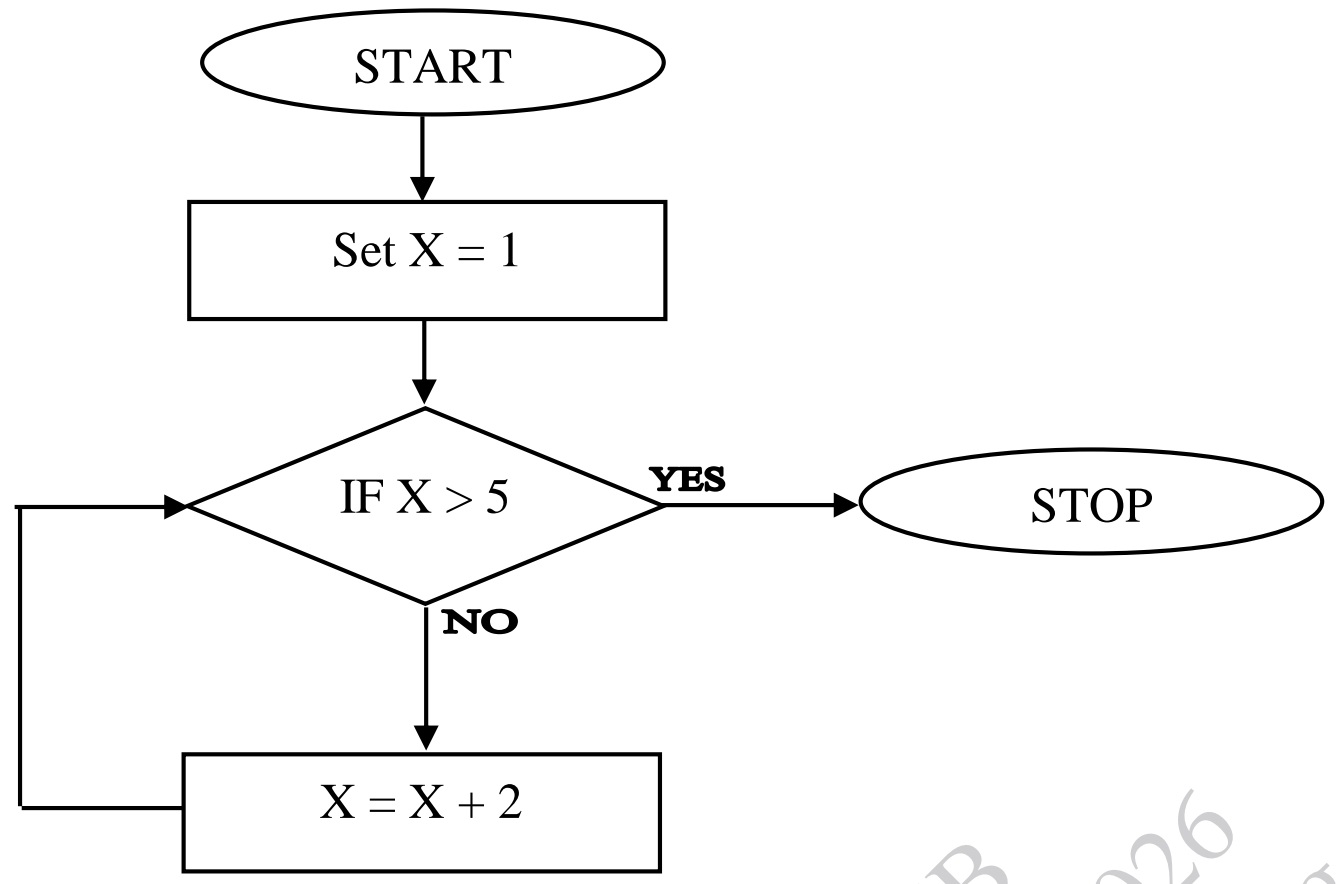
2025 Syllabus Outcome (2.3.3): solve the trace table for a given flowchart.
Consider the given flowchart.
Complete the trace table showing the values of X at each step.
IterationsValue of X
1
2
3
Diagram for Q.1
📋 Official Checking Hints (Marking Rubric • 3 Marks)
  • Correctly determines the value of X for Iteration 1 (X = 3, or initial X = 1).
  • Correctly determines the value of X for Iteration 2 (X = 5, or 3).
  • Correctly determines the value of X for Iteration 3 (X = 7, or 5) where X > 5 terminates the loop.
✓ MODEL SOLUTION (Full Marks Guidance)
Trace Table Solution:
•Initial state before loop: Set X = 1
•Iteration 1: Condition IF X > 5 (1 > 5 is NO) →\rightarrow X = X + 2 = 1 + 2 = 3 (or if tracking X entering each check: Iteration 1 = 3, Iteration 2 = 5, Iteration 3 = 7, after which 7 > 5 is YES and the flowchart stops).
IterationsValue of X (after X = X + 2)
13
25
37
Examiner Suggestion for Improvement: Ensure code syntax, HTML tags, and flowchart trace table steps are written clearly inside the allocated space.
UNIT 3 • 4 SHORT QUESTIONS (CRQS)

Unit 3: Programming Fundamentals (JavaScript, HTML & CSS)

2025 Syllabus Outcome (3.11.3): use the increment (++) and decrement (--) operators in a JavaScript code.
To write an HTML file that initialises a variable score with the value 3 using JavaScript. Where increment (++) operator is used to increase its value by 1 and then display the updated score on the web page.
Write the missing code in the given box to achieve the mentioned task.
HTMLSource Code
<html>
<head>
    <title>Score Increment</title>
</head>
<body>
    <script>
        [ Write missing JavaScript code here ]
    </script>
</body>
</html>
📋 Official Checking Hints (Marking Rubric • 2 Marks)
  • Declares and initialises var score = 3; and applies the increment operator score++;.
  • Displays the updated score on the webpage using document.write(score);.
✓ MODEL SOLUTION (Full Marks Guidance)
JAVASCRIPTSource Code
var score = 3;
score++;
document.write(score);
Examiner Suggestion for Improvement: Ensure code syntax, HTML tags, and flowchart trace table steps are written clearly inside the allocated space.
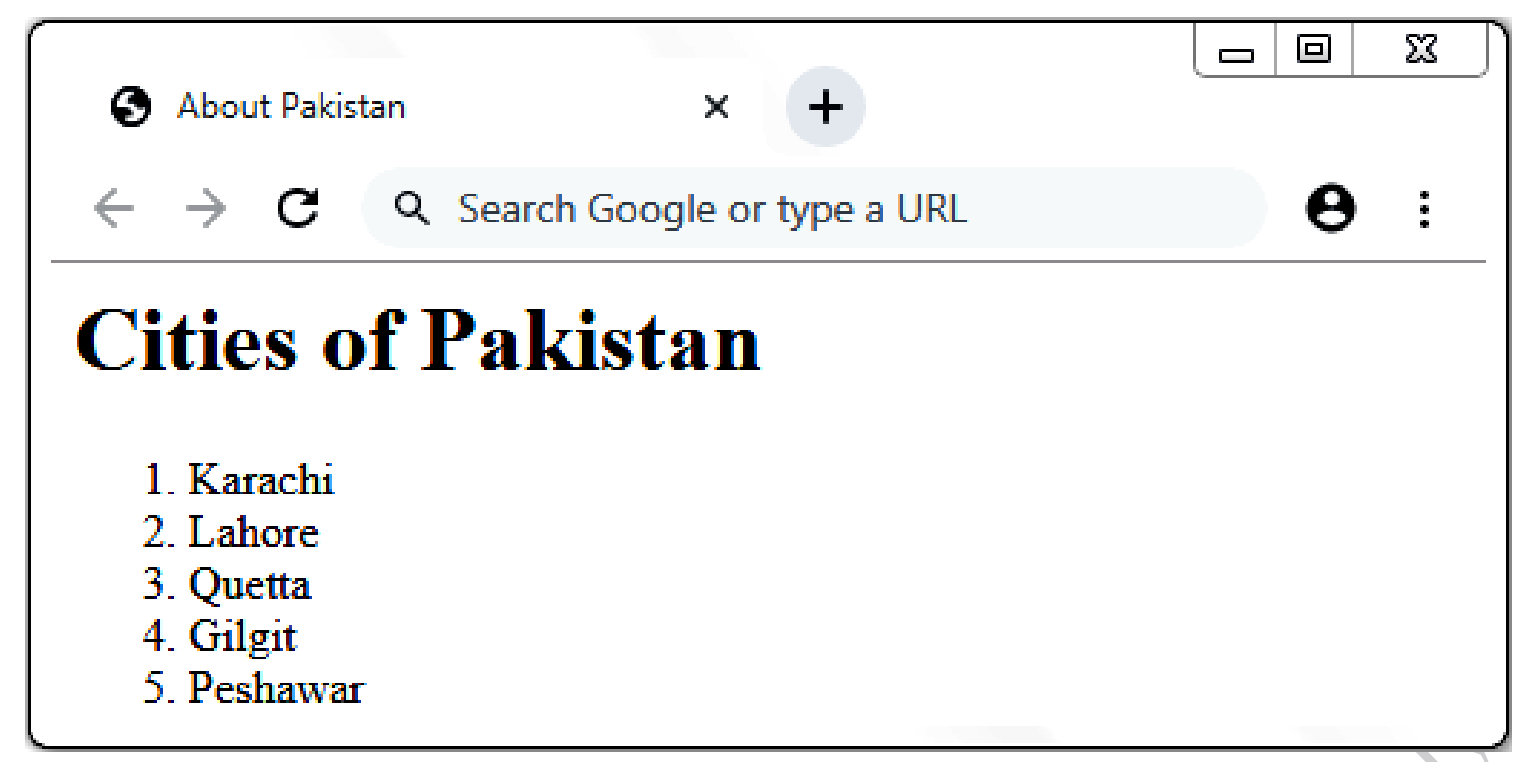
2025 Syllabus Outcome (3.4.1): write HTML code to create: a. ordered list, b. unordered list, c. definition list;
Consider the given image of a web page.
Write the HTML code to display the same web page as in the given image.
Diagram for Q.3
📋 Official Checking Hints (Marking Rubric • 3 Marks)
  • Writes the HTML document structure with <title>About Pakistan</title> and heading <h1>Cities of Pakistan</h1>.
  • Uses the ordered list <ol>...</ol> container tag.
  • Encloses all five city items (Karachi, Lahore, Quetta, Gilgit, Peshawar) inside <li>...</li> tags.
✓ MODEL SOLUTION (Full Marks Guidance)
HTMLSource Code
<html>
<head>
    <title>About Pakistan</title>
</head>
<body>
    <h1>Cities of Pakistan</h1>
    <ol>
        <li>Karachi</li>
        <li>Lahore</li>
        <li>Quetta</li>
        <li>Gilgit</li>
        <li>Peshawar</li>
    </ol>
</body>
</html>
Examiner Suggestion for Improvement: Ensure code syntax, HTML tags, and flowchart trace table steps are written clearly inside the allocated space.
2025 Syllabus Outcome (3.10.5): apply output functions: innerHTML, document.write( ) and window.alert( ) to display the output;
Write an HTML file that includes a JavaScript block. In the script, declare a variable name with the text "Adnan" and display it on the web page using document.write( ).
📋 Official Checking Hints (Marking Rubric • 2 Marks)
  • Creates valid HTML <script>...</script> block and declares var name = "Adnan";.
  • Outputs the variable on the webpage using document.write(name);.
✓ MODEL SOLUTION (Full Marks Guidance)
HTMLSource Code
<html>
<body>
    <script>
        var name = "Adnan";
        document.write(name);
    </script>
</body>
</html>
Examiner Suggestion for Improvement: Ensure code syntax, HTML tags, and flowchart trace table steps are written clearly inside the allocated space.
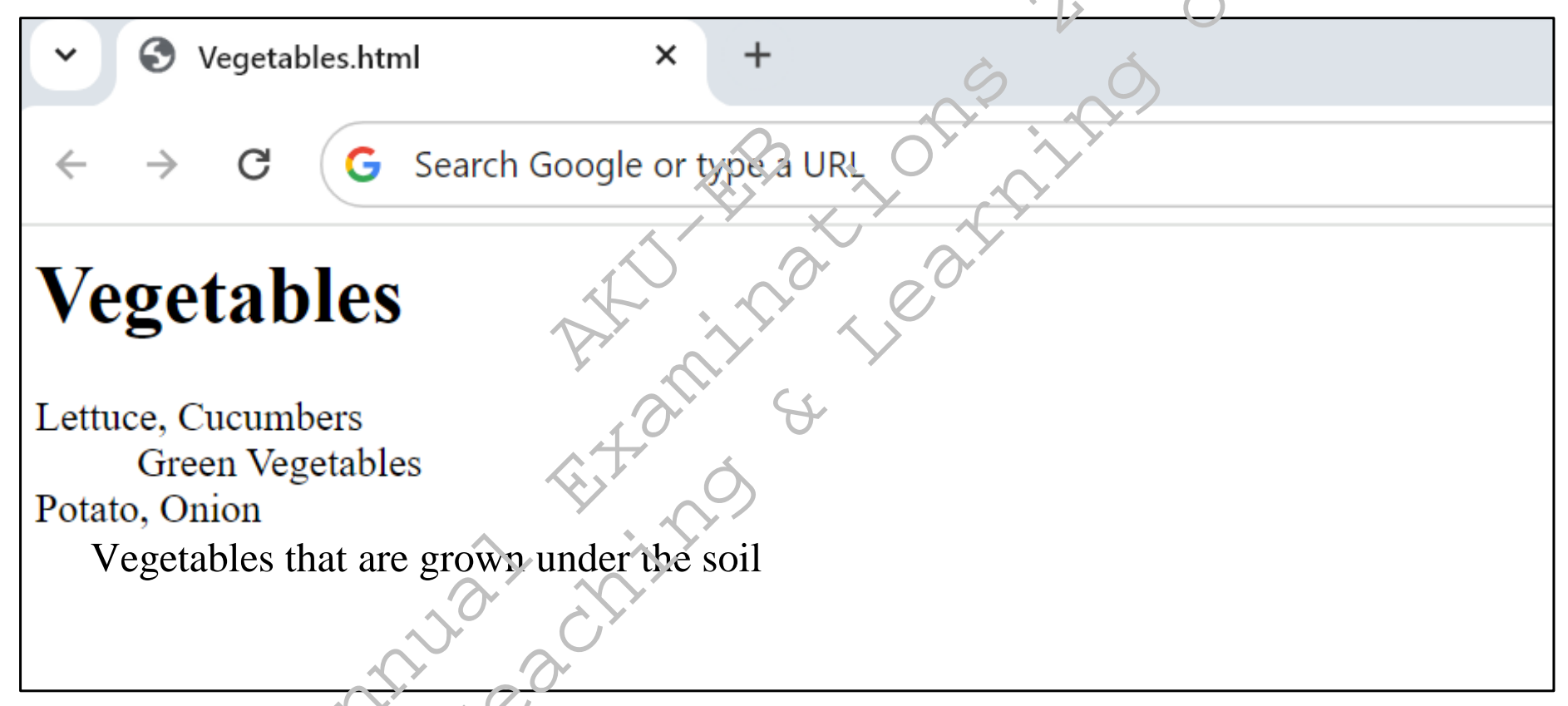
2025 Syllabus Outcome (3.4.1): write HTML code to create: a. ordered list, b. unordered list, c. definition list;
Consider the given image of a web page.
Write the HTML code to display the web page shown in the given image.
Diagram for Q.4
📋 Official Checking Hints (Marking Rubric • 5 Marks)
  • 1 mark for <html> and </html> tags.
  • 1 mark for <body> and </body> tags (and heading <h1>Vegetables</h1>).
  • 1 mark for <dl> and </dl> definition list container tags in the correct place.
  • 1 mark for <dt> and </dt> definition term tags (Lettuce, Cucumbers and Potato, Onion).
  • 1 mark for <dd> and </dd> definition description tags (Green Vegetables and Vegetables that are grown under the soil).
✓ MODEL SOLUTION (Full Marks Guidance)
HTMLSource Code
<html>
<head>
    <title>Vegetables.html</title>
</head>
<body>
    <h1>Vegetables</h1>
    <dl>
        <dt>Lettuce, Cucumbers</dt>
        <dd>Green Vegetables</dd>
        <dt>Potato, Onion</dt>
        <dd>Vegetables that are grown under the soil</dd>
    </dl>
</body>
</html>

Examiner Commentary (Better Responses): In better responses, candidates used the basic tags `<html>`, `<head>`, and `<body>` correctly and applied the definition list tags (`<dl>`, `<dt>`, and `<dd>`) along with `<h1>Vegetables</h1>` to reproduce the indented definition list layout.

⚠ WEAKER RESPONSE (Common Misconceptions & Lost Marks)
In weaker responses, candidates failed to recognise the definition list layout and used <p> and <br> tags instead of <dl>, <dt>, and <dd>.
Examiner Suggestion for Improvement: Review the 2025 E-Marking Notes for examiner commentary on better vs weaker responses.
UNIT 7 • 1 SHORT QUESTIONS (CRQS)

Unit 7: Entrepreneurship in the Digital Age

2025 Syllabus Outcome (7.2.4): apply business models using the Business Model Canvas (BMC);
A company is developing a food delivery app that promises fast delivery of freshly prepared meals to busy urban professionals.
Considering the given situation, what are the THREE steps that a company should focus on to ensure the success of its digital venture.
📋 Official Checking Hints (Marking Rubric • 3 Marks)
  • Identifies customer/market analysis for urban professionals (1 Mark).
  • Identifies app user experience, real-time tracking, or digital payment convenience (1 Mark).
  • Identifies delivery logistics, restaurant partnerships, or digital marketing strategy (1 Mark).
✓ MODEL SOLUTION (Full Marks Guidance)
Three Essential Steps for the Food Delivery Digital Venture:
1.Market Research & Target Customer Analysis: Identify the specific dietary preferences, peak ordering hours, and office locations of busy urban professionals.
2.Value Proposition & App Usability (UI/UX): Build an intuitive mobile interface with real-time GPS order tracking, one-tap digital payments, and guaranteed delivery time windows.
3.Key Partnerships & Logistics Optimization: Partner with reliable local kitchens/restaurants and use route-optimised delivery riders to ensure meals arrive fresh and on time.
Examiner Suggestion for Improvement: Ensure code syntax, HTML tags, and flowchart trace table steps are written clearly inside the allocated space.